Playstore Link:

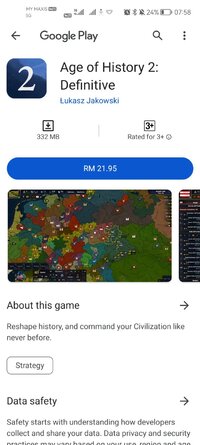
Age of History 2: Definitive - Apps on Google Play
Reshape history, and command your Civilization like never before.
Game Name: Age of History 2: Definitive
Game Version: 2.01957610812950
Needs OBB: No
Needs Root: No
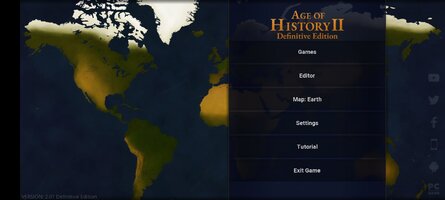
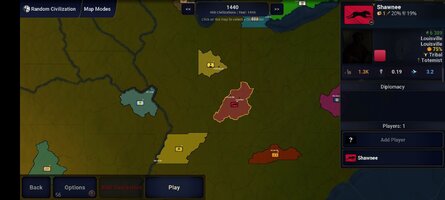
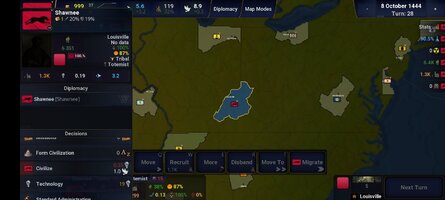
The Definitive Edition of a grand strategy classic, now featuring improved gameplay, a new map with 13,892 provinces, expanded diplomacy, wartime capitulation, faster army recruitment and movement, 32 new religions, new civilizations, new scenarios, atomic weapons, additional government types, new wonders, enhanced graphics, numerous quality-of-life improvements, improved AI behavior, new notifications, improved province border visuals, province names displayed directly on the map, modernized menus, a simplified and responsive UI for better usability, engine updates, performance improvements, and much more.
New Diplomacy Actions
Enforce Peace, Intervene in War, Join War, AI Army Control (On/Off)
Send Volunteer Army, Regroup All Armies, Provoke Rebels
Host Diplomatic Summit, Spread Propaganda, Recruit Mercenaries
Administration Policy, Impose Sanctions, Share Technology
Population Relocation, Request Loan, Offer Debt Relief
Ask to Become a Vassal, Transfer Vassal, Propose Union, Found a City
Invest in Foreign Provinces, Build in Foreign Provinces
Mass province actions allowing you to instantly invest, build, or assimilate across all provinces with a single click.
Age of History 2: Definitive Edition
Age of History is a grand strategy wargame that is simple to learn yet hard to master.
Your objective is to use military tactics and cunning diplomacy to either unify the world, or conquer it. Will the world bleed out or bow before you? The choice is yours...
Approach to History
Age of History 2 spans the full scope of human history, from the dawn of civilization to the distant future.
Historical Grand Campaign
Play as any civilization, from the largest empires to the smallest tribes. Lead your people across the centuries in a campaign that reshapes the fate of humanity.
Classic Features
A detailed world map with historical borders
Deep diplomacy system between Civilizations
Revolutions and civil wars
Hotseat multiplayer, play with as many players as Civilizations
Rich population diversity and terrain types
Create your own history with built-in editors
End-game timelapses of your empire’s rise
Game Editors
Scenario Editor
Civilization Creator
Flag Maker
Wasteland Editor
Map and Province Editors
Growth Rate, City, and Terrain Editors
Custom Diplomacy Colors, Alliances, Continents, and more
New Diplomacy Actions
Enforce Peace, Intervene in War, Join War, AI Army Control (On/Off)
Send Volunteer Army, Regroup All Armies, Provoke Rebels
Host Diplomatic Summit, Spread Propaganda, Recruit Mercenaries
Administration Policy, Impose Sanctions, Share Technology
Population Relocation, Request Loan, Offer Debt Relief
Ask to Become a Vassal, Transfer Vassal, Propose Union, Found a City
Invest in Foreign Provinces, Build in Foreign Provinces
Mass province actions allowing you to instantly invest, build, or assimilate across all provinces with a single click.
Age of History 2: Definitive Edition
Age of History is a grand strategy wargame that is simple to learn yet hard to master.
Your objective is to use military tactics and cunning diplomacy to either unify the world, or conquer it. Will the world bleed out or bow before you? The choice is yours...
Approach to History
Age of History 2 spans the full scope of human history, from the dawn of civilization to the distant future.
Historical Grand Campaign
Play as any civilization, from the largest empires to the smallest tribes. Lead your people across the centuries in a campaign that reshapes the fate of humanity.
Classic Features
A detailed world map with historical borders
Deep diplomacy system between Civilizations
Revolutions and civil wars
Hotseat multiplayer, play with as many players as Civilizations
Rich population diversity and terrain types
Create your own history with built-in editors
End-game timelapses of your empire’s rise
Game Editors
Scenario Editor
Civilization Creator
Flag Maker
Wasteland Editor
Map and Province Editors
Growth Rate, City, and Terrain Editors
Custom Diplomacy Colors, Alliances, Continents, and more
*MOD Features*
Unlock full content
Credit to: ?
Free Download:
! Hidden Content !
You must be registered and either click Like under this post or leave a comment before you can see the hidden links.
You may need to refresh the page after clicking Like. If you’re still having trouble revealing the hidden links, please
read this.
Did you know? VIP Members can see all links instantly, no unlocking required.
Interested? Get VIP here.
Interested? Get VIP here.
______________________________________
If credits are unknown or incorrect and you are the modder you are free to message @G-Bo and the credits will be corrected asap!
What you need to know about Shared-MODs
*How to install (click the spoilers to read)*
Signed APKs do work on all Android devices (rooted + non-rooted).
Signed APKs are in the most cases the only provided files by the mod publisher as they work for everyone.
1.) Remove the original game/app.
2.) Download the MOD APK.
3.) Install the downloaded MOD APK.
4.) Enjoy.
Regarding login methods, please note that logging in with Google will not be possible when using signed MODs. Facebook login (if available) is possible, but it requires you to remove the Facebook application from your device. Other game-specific login methods (if available), such as email, transfer code or guest login usually work fine.
Notes:
- If you used our MOD APK before and just want to update, you can install the new MOD APK on top of the old without removing the game/app first.
- In-App purchases are not possible on signed APKs as they require Google services similar to the Google login process.
Signed APKs are in the most cases the only provided files by the mod publisher as they work for everyone.
1.) Remove the original game/app.
2.) Download the MOD APK.
3.) Install the downloaded MOD APK.
4.) Enjoy.
Regarding login methods, please note that logging in with Google will not be possible when using signed MODs. Facebook login (if available) is possible, but it requires you to remove the Facebook application from your device. Other game-specific login methods (if available), such as email, transfer code or guest login usually work fine.
Notes:
- If you used our MOD APK before and just want to update, you can install the new MOD APK on top of the old without removing the game/app first.
- In-App purchases are not possible on signed APKs as they require Google services similar to the Google login process.
Unsigned APKs do only work on rooted and patched devices/environments.
These are not always provided by the mod publisher as they do only work under certain circumstances.
1.) Your device must be rooted.
2.) Your device must be patched to ignore app signatures. This can be done with the help of tools such as Luckypatcher or Xposed.
Once you fill that requirements the process is the same as with signed APKs with the difference that you can overwrite the original game/app with the MOD APK without removing it first.
1.) Download the unsigned MOD APK.
2.) Install the unsigned MOD APK.
3.) Enjoy.
Note:
For the case the unsigned APK does fail to install: Your device patch is not done correctly!
Login methods and In-App purchases on unsigned MODs function the same as in the original game. Logging in with Google works without issues. Keeping the Facebook application installed is also no problem.
You are rooted and want to know how to patch your device? Please check this for more information:
[Videotutorial] How To Login With Google+ Or Facebook App On Modded Games
These are not always provided by the mod publisher as they do only work under certain circumstances.
1.) Your device must be rooted.
2.) Your device must be patched to ignore app signatures. This can be done with the help of tools such as Luckypatcher or Xposed.
Once you fill that requirements the process is the same as with signed APKs with the difference that you can overwrite the original game/app with the MOD APK without removing it first.
1.) Download the unsigned MOD APK.
2.) Install the unsigned MOD APK.
3.) Enjoy.
Note:
For the case the unsigned APK does fail to install: Your device patch is not done correctly!
Login methods and In-App purchases on unsigned MODs function the same as in the original game. Logging in with Google works without issues. Keeping the Facebook application installed is also no problem.
You are rooted and want to know how to patch your device? Please check this for more information:
[Videotutorial] How To Login With Google+ Or Facebook App On Modded Games
OBB files are not required by every game/app. If necessary, the mod publisher will usually provide them and tell you that they are needed.
1.) Download the OBB file/files.
2.) Download the MOD APK.
3.) Move the OBB files with the help of a filemanager to Android/obb/<packagecode> on your device.
4.) Install the downloaded MOD APK.
5.) Enjoy.
The OBB files are either provided as ".obb" files or as ".zip" files. ZIP files do require to be extracted first.
Still facing issues? Please check here for more details:
How to install OBB files [as detailed as possible]
1.) Download the OBB file/files.
2.) Download the MOD APK.
3.) Move the OBB files with the help of a filemanager to Android/obb/<packagecode> on your device.
4.) Install the downloaded MOD APK.
5.) Enjoy.
The OBB files are either provided as ".obb" files or as ".zip" files. ZIP files do require to be extracted first.
Still facing issues? Please check here for more details:
How to install OBB files [as detailed as possible]
Tutorials:
How to sign up and download on Platinmods.com
List of useful tutorials about how to use this website and its content