Playstore Link:
Back Wars - Apps on Google Play
Travel back in time to rule the world 1,000 years in advance!
Game Name: Back Wars
Game Version: 1.150.64
Needs OBB: No
Needs Root: No
When an army travels back in time to rule the world 1,000 years in advance, they get more than they bargained for from their primitive counterparts! Lead the resistance with hundreds of warriors from different cultures all over the world. Focus on one individual or step back to command an entire army at your fingertips. Combining world-dominating strategy with fully interactive battles, this game offers the best of both worlds! And just when you think it's over, history might just repeat itself...
UPGRADES
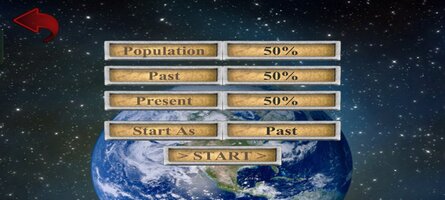
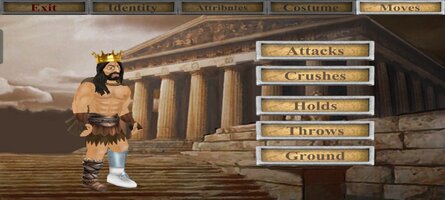
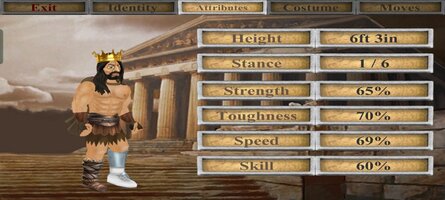
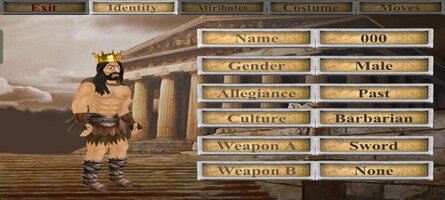
The game is mostly free to play, but you can upgrade to take control of your experience - choosing which side and how much territory to start with. You can also blow off steam with fantasy battles between any 2 cultures - and as many warriors as your device can handle! For what it's worth, you can also edit every character in the world - but please note that this game uses up to 1,000 of them that are regularly replaced.
CONTROLS
When controlling a specific character, this game offers either the "Classic" 1-handed control system or "Dual Wield" where each hand is controlled separately. If you are not already familiar with these from previous games in the series, you can pause the action at any time by hitting the dateline and then study the "Controls" guide. Also look out for in-game hints from scrolls or books that you can read.
In this game, you can change which member of the team you are controlling at any time by either tapping the health meter or literally pointing to them on the battlefield. By tapping the arrows at the bottom of the screen, you can also activate "Commander" mode where you step back and direct any active member of your team by simply swiping from their location to another. Whether you intend them to relocate, fight an enemy, or pick up an object, they will try to make sense of your instructions. But please bear in mind that they can only do so at their convenience and may have other priorities!
Whatever device or control method you are using, you can always zoom in or out by pinching at the centre of the screen.
MAP
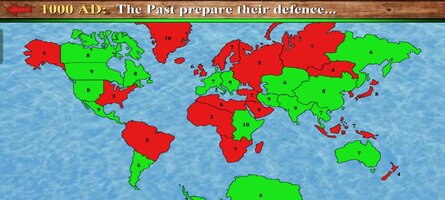
The main "Campaign" game mode requires you to increase your territory by moving units from one area to any connected one. You can either "fortify" an existing territory or attempt to seize a rival territory. Note that only 50% of the units in a territory will be available to travel - which necessarily makes it harder to invade than it is to defend.
The population of any inhabited territory may grow after each round, so it is important to control as many as possible. Notice that units will also gradually heal over time, so it is a good idea to work with different locations each turn.
PERFORMANCE
Please note that this is the largest scale game I have made yet, and may require a high-end device to run at 100%. Consider keeping the "Population" low to reduce the number of characters on screen, or tone down other features in the "Display" options.
I regret there is more to this game than I could ever explain here, so I hope you enjoy figuring some things out for yourself!
UPGRADES
The game is mostly free to play, but you can upgrade to take control of your experience - choosing which side and how much territory to start with. You can also blow off steam with fantasy battles between any 2 cultures - and as many warriors as your device can handle! For what it's worth, you can also edit every character in the world - but please note that this game uses up to 1,000 of them that are regularly replaced.
CONTROLS
When controlling a specific character, this game offers either the "Classic" 1-handed control system or "Dual Wield" where each hand is controlled separately. If you are not already familiar with these from previous games in the series, you can pause the action at any time by hitting the dateline and then study the "Controls" guide. Also look out for in-game hints from scrolls or books that you can read.
In this game, you can change which member of the team you are controlling at any time by either tapping the health meter or literally pointing to them on the battlefield. By tapping the arrows at the bottom of the screen, you can also activate "Commander" mode where you step back and direct any active member of your team by simply swiping from their location to another. Whether you intend them to relocate, fight an enemy, or pick up an object, they will try to make sense of your instructions. But please bear in mind that they can only do so at their convenience and may have other priorities!
Whatever device or control method you are using, you can always zoom in or out by pinching at the centre of the screen.
MAP
The main "Campaign" game mode requires you to increase your territory by moving units from one area to any connected one. You can either "fortify" an existing territory or attempt to seize a rival territory. Note that only 50% of the units in a territory will be available to travel - which necessarily makes it harder to invade than it is to defend.
The population of any inhabited territory may grow after each round, so it is important to control as many as possible. Notice that units will also gradually heal over time, so it is a good idea to work with different locations each turn.
PERFORMANCE
Please note that this is the largest scale game I have made yet, and may require a high-end device to run at 100%. Consider keeping the "Population" low to reduce the number of characters on screen, or tone down other features in the "Display" options.
I regret there is more to this game than I could ever explain here, so I hope you enjoy figuring some things out for yourself!
*MOD Features*
Full version available
Free Download:
! Hidden Content !
You must be registered and either click Like under this post or leave a comment before you can see the hidden links.
You may need to refresh the page after clicking Like. If you’re still having trouble revealing the hidden links, please
read this.
Did you know? VIP Members can see all links instantly, no unlocking required.
Interested? Get VIP here.
Interested? Get VIP here.
______________________________________
If credits are unknown or incorrect and you are the modder you are free to message @G-Bo and the credits will be corrected asap!
What you need to know about Shared-MODs
*How to install (click the spoilers to read)*
Signed APKs do work on all Android devices (rooted + non-rooted).
Signed APKs are in the most cases the only provided files by the mod publisher as they work for everyone.
1.) Remove the original game/app.
2.) Download the MOD APK.
3.) Install the downloaded MOD APK.
4.) Enjoy.
Regarding login methods, please note that logging in with Google will not be possible when using signed MODs. Facebook login (if available) is possible, but it requires you to remove the Facebook application from your device. Other game-specific login methods (if available), such as email, transfer code or guest login usually work fine.
Notes:
- If you used our MOD APK before and just want to update, you can install the new MOD APK on top of the old without removing the game/app first.
- In-App purchases are not possible on signed APKs as they require Google services similar to the Google login process.
Signed APKs are in the most cases the only provided files by the mod publisher as they work for everyone.
1.) Remove the original game/app.
2.) Download the MOD APK.
3.) Install the downloaded MOD APK.
4.) Enjoy.
Regarding login methods, please note that logging in with Google will not be possible when using signed MODs. Facebook login (if available) is possible, but it requires you to remove the Facebook application from your device. Other game-specific login methods (if available), such as email, transfer code or guest login usually work fine.
Notes:
- If you used our MOD APK before and just want to update, you can install the new MOD APK on top of the old without removing the game/app first.
- In-App purchases are not possible on signed APKs as they require Google services similar to the Google login process.
Unsigned APKs do only work on rooted and patched devices/environments.
These are not always provided by the mod publisher as they do only work under certain circumstances.
1.) Your device must be rooted.
2.) Your device must be patched to ignore app signatures. This can be done with the help of tools such as Luckypatcher or Xposed.
Once you fill that requirements the process is the same as with signed APKs with the difference that you can overwrite the original game/app with the MOD APK without removing it first.
1.) Download the unsigned MOD APK.
2.) Install the unsigned MOD APK.
3.) Enjoy.
Note:
For the case the unsigned APK does fail to install: Your device patch is not done correctly!
Login methods and In-App purchases on unsigned MODs function the same as in the original game. Logging in with Google works without issues. Keeping the Facebook application installed is also no problem.
You are rooted and want to know how to patch your device? Please check this for more information:
[Videotutorial] How To Login With Google+ Or Facebook App On Modded Games
These are not always provided by the mod publisher as they do only work under certain circumstances.
1.) Your device must be rooted.
2.) Your device must be patched to ignore app signatures. This can be done with the help of tools such as Luckypatcher or Xposed.
Once you fill that requirements the process is the same as with signed APKs with the difference that you can overwrite the original game/app with the MOD APK without removing it first.
1.) Download the unsigned MOD APK.
2.) Install the unsigned MOD APK.
3.) Enjoy.
Note:
For the case the unsigned APK does fail to install: Your device patch is not done correctly!
Login methods and In-App purchases on unsigned MODs function the same as in the original game. Logging in with Google works without issues. Keeping the Facebook application installed is also no problem.
You are rooted and want to know how to patch your device? Please check this for more information:
[Videotutorial] How To Login With Google+ Or Facebook App On Modded Games
OBB files are not required by every game/app. If necessary, the mod publisher will usually provide them and tell you that they are needed.
1.) Download the OBB file/files.
2.) Download the MOD APK.
3.) Move the OBB files with the help of a filemanager to Android/obb/<packagecode> on your device.
4.) Install the downloaded MOD APK.
5.) Enjoy.
The OBB files are either provided as ".obb" files or as ".zip" files. ZIP files do require to be extracted first.
Still facing issues? Please check here for more details:
How to install OBB files [as detailed as possible]
1.) Download the OBB file/files.
2.) Download the MOD APK.
3.) Move the OBB files with the help of a filemanager to Android/obb/<packagecode> on your device.
4.) Install the downloaded MOD APK.
5.) Enjoy.
The OBB files are either provided as ".obb" files or as ".zip" files. ZIP files do require to be extracted first.
Still facing issues? Please check here for more details:
How to install OBB files [as detailed as possible]
Tutorials:
How to sign up and download on Platinmods.com
List of useful tutorials about how to use this website and its content