Playstore Link:

Game Name: COOP TD: Together
Game Version: 1.5.7
Needs OBB: No
Needs Root: No
*MOD Features*
EXPERIMENTAL
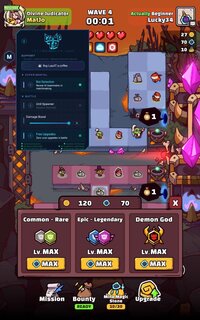
1. Bot Detection — Mod icon turns RED if matchmaking pairs you with a server-side AI bot
(needs further testing to verify full functionality)
BATTLE
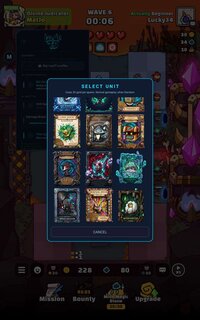
2. Unit Spawner — Choose any demon/god to spawn instead of random
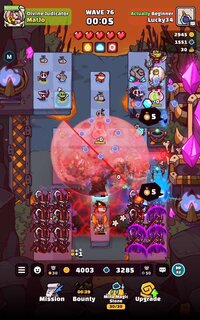
3. Damage Boost — ATK%, Crit Rate, Crit Damage scaling slider (1-20 tiers)
4. Free Upgrades — Zero cost upgrades in battle
5. Max Relics — Boost all owned relics to max
6. Max Runes — Boost all owned runes to max
VIP
7. 2x Speed — Permanent 2x battle speed (no daily limit, no ads)
8. Ad-Free — Removes all ads
9. Gold Name — Gold nickname in-game
ALWAYS ACTIVE
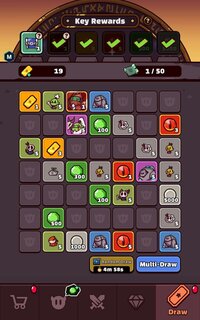
10. Unlimited Stamina (25/25 display)
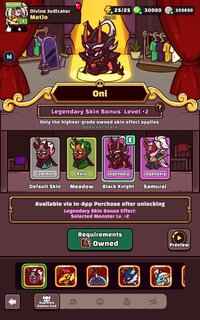
11. All Skins — Auto-equips best skin per unit in battle
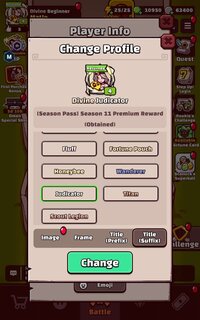
12. All Cosmetics — Icons, frames & titles unlocked
13. Max Unit Enhance — All units at max level
14. Max Liberations — For liberation-eligible Supreme Demon Gods
15. Max Traits auto-equipped per game mode
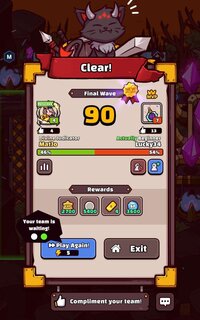
16. x3 Rewards multiplier (use in-game +/- buttons)
ACCOUNT
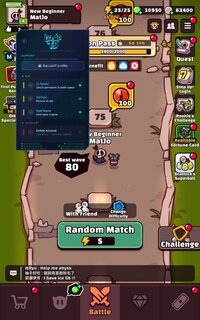
17. Skip Tutorial
18. Save / Restore — Backup/restore guest account credentials
19. Delete Account
Changelog (V1.8)
• Fixed Liberation Levels
• Added Bot Detection (Experimental)
KNOWN ISSUES
When using the skip tutorial feature, the first launch leave the UI unresponsive, you will need to restart a second time to fix this issue. I will work on fixing this in a later release.
UNVERIFIED ISSUES
There is a possibility that on certain devices the game will not load past the black screen. I have not verified this, as I do not have enough data from testers at this time. Please report any issues you run into while using the mod menu in the comments.
Testing was done on Pixel 6 & S24 Ultra
How To Install:
You need an application that can install splits. I use SAI, linked below.
Release SAI 4.5 · Aefyr/SAI
• Added a setting to disable opening .apk files via SAI • SAF fixes for Android 11 • Added warning when installing huge (>150MB) apps
 github.com
Credit to: LuaJiT
Free Download:
! Hidden Content !
You must be registered and either click Like under this post or leave a comment before you can see the hidden links.
You may need to refresh the page after clicking Like. If you’re still having trouble revealing the hidden links, please
read this.
Did you know? VIP Members can see all links instantly, no unlocking required.
Interested? Get VIP here.
Interested? Get VIP here.
______________________________________
If credits are unknown or incorrect and you are the modder you are free to message @G-Bo and the credits will be corrected asap!
What you need to know about Shared-MODs
*How to install (click the spoilers to read)*
Signed APKs do work on all Android devices (rooted + non-rooted).
Signed APKs are in the most cases the only provided files by the mod publisher as they work for everyone.
1.) Remove the original game/app.
2.) Download the MOD APK.
3.) Install the downloaded MOD APK.
4.) Enjoy.
Regarding login methods, please note that logging in with Google will not be possible when using signed MODs. Facebook login (if available) is possible, but it requires you to remove the Facebook application from your device. Other game-specific login methods (if available), such as email, transfer code or guest login usually work fine.
Notes:
- If you used our MOD APK before and just want to update, you can install the new MOD APK on top of the old without removing the game/app first.
- In-App purchases are not possible on signed APKs as they require Google services similar to the Google login process.
Signed APKs are in the most cases the only provided files by the mod publisher as they work for everyone.
1.) Remove the original game/app.
2.) Download the MOD APK.
3.) Install the downloaded MOD APK.
4.) Enjoy.
Regarding login methods, please note that logging in with Google will not be possible when using signed MODs. Facebook login (if available) is possible, but it requires you to remove the Facebook application from your device. Other game-specific login methods (if available), such as email, transfer code or guest login usually work fine.
Notes:
- If you used our MOD APK before and just want to update, you can install the new MOD APK on top of the old without removing the game/app first.
- In-App purchases are not possible on signed APKs as they require Google services similar to the Google login process.
Unsigned APKs do only work on rooted and patched devices/environments.
These are not always provided by the mod publisher as they do only work under certain circumstances.
1.) Your device must be rooted.
2.) Your device must be patched to ignore app signatures. This can be done with the help of tools such as Luckypatcher or Xposed.
Once you fill that requirements the process is the same as with signed APKs with the difference that you can overwrite the original game/app with the MOD APK without removing it first.
1.) Download the unsigned MOD APK.
2.) Install the unsigned MOD APK.
3.) Enjoy.
Note:
For the case the unsigned APK does fail to install: Your device patch is not done correctly!
Login methods and In-App purchases on unsigned MODs function the same as in the original game. Logging in with Google works without issues. Keeping the Facebook application installed is also no problem.
You are rooted and want to know how to patch your device? Please check this for more information:
[Videotutorial] How To Login With Google+ Or Facebook App On Modded Games
These are not always provided by the mod publisher as they do only work under certain circumstances.
1.) Your device must be rooted.
2.) Your device must be patched to ignore app signatures. This can be done with the help of tools such as Luckypatcher or Xposed.
Once you fill that requirements the process is the same as with signed APKs with the difference that you can overwrite the original game/app with the MOD APK without removing it first.
1.) Download the unsigned MOD APK.
2.) Install the unsigned MOD APK.
3.) Enjoy.
Note:
For the case the unsigned APK does fail to install: Your device patch is not done correctly!
Login methods and In-App purchases on unsigned MODs function the same as in the original game. Logging in with Google works without issues. Keeping the Facebook application installed is also no problem.
You are rooted and want to know how to patch your device? Please check this for more information:
[Videotutorial] How To Login With Google+ Or Facebook App On Modded Games
OBB files are not required by every game/app. If necessary, the mod publisher will usually provide them and tell you that they are needed.
1.) Download the OBB file/files.
2.) Download the MOD APK.
3.) Move the OBB files with the help of a filemanager to Android/obb/<packagecode> on your device.
4.) Install the downloaded MOD APK.
5.) Enjoy.
The OBB files are either provided as ".obb" files or as ".zip" files. ZIP files do require to be extracted first.
Still facing issues? Please check here for more details:
How to install OBB files [as detailed as possible]
1.) Download the OBB file/files.
2.) Download the MOD APK.
3.) Move the OBB files with the help of a filemanager to Android/obb/<packagecode> on your device.
4.) Install the downloaded MOD APK.
5.) Enjoy.
The OBB files are either provided as ".obb" files or as ".zip" files. ZIP files do require to be extracted first.
Still facing issues? Please check here for more details:
How to install OBB files [as detailed as possible]
Tutorials:
How to sign up and download on Platinmods.com
List of useful tutorials about how to use this website and its content