Playstore Link:
Defense Zone 3 Ultra HD - Apps on Google Play
Welcome to the long-awaited sequel to the strategy game!
Game Name: Defense Zone 3 Ultra HD
Game Version: 1.6.50
Needs OBB: No
Needs Root: No
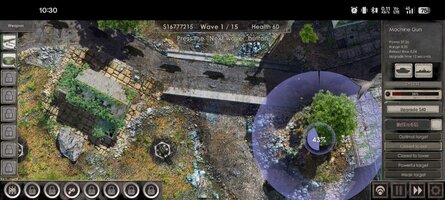
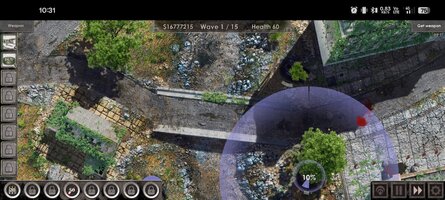
Version games in high detail graphics Ultra HD (4K)
Welcome to the long-awaited sequel to the popular action/strategy game! New weapons, landscapes, and options galore! Every game session is now even more dynamic and amazing.
The core of the game is still the same: entire armies of enemies rush at your defenses, trying to destroy them by any means necessary. But now they’re even more powerful and madder than ever.
You’ll have access to older, time-tested turrets, as well as completely new types of weapons. It’s up to you to decide how to spend your available budget. Should you build new towers or upgrade and fortify the ones you already have? Turrets vary in terms of their attack range, firing speed, and damage type. The only way to win is to combine them so that they complement and strengthen one another.
The flexible difficulty settings will allow every player to get as much enjoyment out of the game as possible. If you’re an experienced commander, you’ll love the merciless, intense battles where the countdown where even a fraction of a second is vital to success and everything hinges on your ability to choose and arrange your turrets wisely. If you’re a new player, you’ll easily be able to train and prepare yourself for serious battles.
Either way, the thoughtfully designed maps and wide range of available turrets will provide you with virtually endless tactical options. Thanks to the stunning, detailed landscapes, painstakingly drawn towers, and incredible special effect, you won’t be able to take your eyes off the screen.
All aspects of the game have been meticulously balanced, including tower statistics, enemy strength, terrain characteristics, and special weapons. You’ll never get bored by too-easy gameplay. Every level will challenge you. Are you ready to accept the challenge?
Features:
• Graphics resolution in Ultra HD (4K)
• Four difficulty levels
• Eight kinds of turrets
• Eight special abilities, from Air Strikes to Nuclear Bombs
• Varied seasons and types of landscapes
• Support for over 60 languages
__________________________
Visit our website: Defense Zone — Игры от разработчика Artem Kotov
Welcome to the long-awaited sequel to the popular action/strategy game! New weapons, landscapes, and options galore! Every game session is now even more dynamic and amazing.
The core of the game is still the same: entire armies of enemies rush at your defenses, trying to destroy them by any means necessary. But now they’re even more powerful and madder than ever.
You’ll have access to older, time-tested turrets, as well as completely new types of weapons. It’s up to you to decide how to spend your available budget. Should you build new towers or upgrade and fortify the ones you already have? Turrets vary in terms of their attack range, firing speed, and damage type. The only way to win is to combine them so that they complement and strengthen one another.
The flexible difficulty settings will allow every player to get as much enjoyment out of the game as possible. If you’re an experienced commander, you’ll love the merciless, intense battles where the countdown where even a fraction of a second is vital to success and everything hinges on your ability to choose and arrange your turrets wisely. If you’re a new player, you’ll easily be able to train and prepare yourself for serious battles.
Either way, the thoughtfully designed maps and wide range of available turrets will provide you with virtually endless tactical options. Thanks to the stunning, detailed landscapes, painstakingly drawn towers, and incredible special effect, you won’t be able to take your eyes off the screen.
All aspects of the game have been meticulously balanced, including tower statistics, enemy strength, terrain characteristics, and special weapons. You’ll never get bored by too-easy gameplay. Every level will challenge you. Are you ready to accept the challenge?
Features:
• Graphics resolution in Ultra HD (4K)
• Four difficulty levels
• Eight kinds of turrets
• Eight special abilities, from Air Strikes to Nuclear Bombs
• Varied seasons and types of landscapes
• Support for over 60 languages
__________________________
Visit our website: Defense Zone — Игры от разработчика Artem Kotov
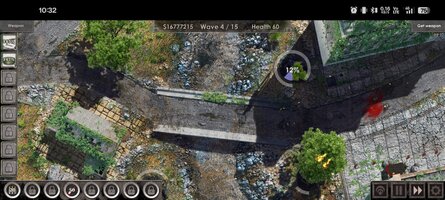
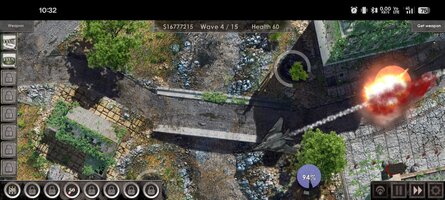
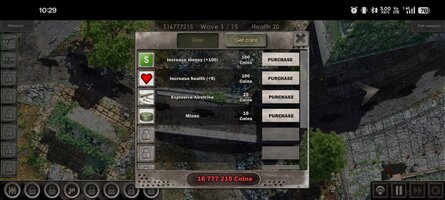
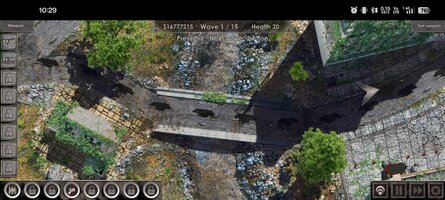
*MOD Features*
Unlimited Money
Unlimited Coins
Credit to: ?
Free Download:
! Hidden Content !
You must be registered and either click Like under this post or leave a comment before you can see the hidden links.
You may need to refresh the page after clicking Like. If you’re still having trouble revealing the hidden links, please
read this.
Did you know? VIP Members can see all links instantly, no unlocking required.
Interested? Get VIP here.
Interested? Get VIP here.
______________________________________
If credits are unknown or incorrect and you are the modder you are free to message @G-Bo and the credits will be corrected asap!
What you need to know about Shared-MODs
*How to install (click the spoilers to read)*
Signed APKs do work on all Android devices (rooted + non-rooted).
Signed APKs are in the most cases the only provided files by the mod publisher as they work for everyone.
1.) Remove the original game/app.
2.) Download the MOD APK.
3.) Install the downloaded MOD APK.
4.) Enjoy.
Regarding login methods, please note that logging in with Google will not be possible when using signed MODs. Facebook login (if available) is possible, but it requires you to remove the Facebook application from your device. Other game-specific login methods (if available), such as email, transfer code or guest login usually work fine.
Notes:
- If you used our MOD APK before and just want to update, you can install the new MOD APK on top of the old without removing the game/app first.
- In-App purchases are not possible on signed APKs as they require Google services similar to the Google login process.
Signed APKs are in the most cases the only provided files by the mod publisher as they work for everyone.
1.) Remove the original game/app.
2.) Download the MOD APK.
3.) Install the downloaded MOD APK.
4.) Enjoy.
Regarding login methods, please note that logging in with Google will not be possible when using signed MODs. Facebook login (if available) is possible, but it requires you to remove the Facebook application from your device. Other game-specific login methods (if available), such as email, transfer code or guest login usually work fine.
Notes:
- If you used our MOD APK before and just want to update, you can install the new MOD APK on top of the old without removing the game/app first.
- In-App purchases are not possible on signed APKs as they require Google services similar to the Google login process.
Unsigned APKs do only work on rooted and patched devices/environments.
These are not always provided by the mod publisher as they do only work under certain circumstances.
1.) Your device must be rooted.
2.) Your device must be patched to ignore app signatures. This can be done with the help of tools such as Luckypatcher or Xposed.
Once you fill that requirements the process is the same as with signed APKs with the difference that you can overwrite the original game/app with the MOD APK without removing it first.
1.) Download the unsigned MOD APK.
2.) Install the unsigned MOD APK.
3.) Enjoy.
Note:
For the case the unsigned APK does fail to install: Your device patch is not done correctly!
Login methods and In-App purchases on unsigned MODs function the same as in the original game. Logging in with Google works without issues. Keeping the Facebook application installed is also no problem.
You are rooted and want to know how to patch your device? Please check this for more information:
[Videotutorial] How To Login With Google+ Or Facebook App On Modded Games
These are not always provided by the mod publisher as they do only work under certain circumstances.
1.) Your device must be rooted.
2.) Your device must be patched to ignore app signatures. This can be done with the help of tools such as Luckypatcher or Xposed.
Once you fill that requirements the process is the same as with signed APKs with the difference that you can overwrite the original game/app with the MOD APK without removing it first.
1.) Download the unsigned MOD APK.
2.) Install the unsigned MOD APK.
3.) Enjoy.
Note:
For the case the unsigned APK does fail to install: Your device patch is not done correctly!
Login methods and In-App purchases on unsigned MODs function the same as in the original game. Logging in with Google works without issues. Keeping the Facebook application installed is also no problem.
You are rooted and want to know how to patch your device? Please check this for more information:
[Videotutorial] How To Login With Google+ Or Facebook App On Modded Games
OBB files are not required by every game/app. If necessary, the mod publisher will usually provide them and tell you that they are needed.
1.) Download the OBB file/files.
2.) Download the MOD APK.
3.) Move the OBB files with the help of a filemanager to Android/obb/<packagecode> on your device.
4.) Install the downloaded MOD APK.
5.) Enjoy.
The OBB files are either provided as ".obb" files or as ".zip" files. ZIP files do require to be extracted first.
Still facing issues? Please check here for more details:
How to install OBB files [as detailed as possible]
1.) Download the OBB file/files.
2.) Download the MOD APK.
3.) Move the OBB files with the help of a filemanager to Android/obb/<packagecode> on your device.
4.) Install the downloaded MOD APK.
5.) Enjoy.
The OBB files are either provided as ".obb" files or as ".zip" files. ZIP files do require to be extracted first.
Still facing issues? Please check here for more details:
How to install OBB files [as detailed as possible]
Tutorials:
How to sign up and download on Platinmods.com
List of useful tutorials about how to use this website and its content