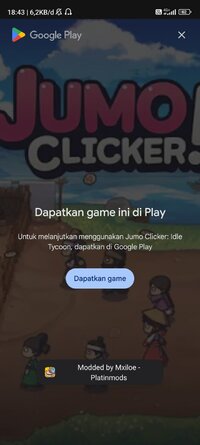
Playstore Link:

Jumo Clicker: Idle Tycoon - Apps on Google Play
Tap to grow your Korean tavern! Hire chef, cook hotteok, manage business empire!
Game Name: Jumo Clicker: Idle Tycoon
Game Version: 1.1.52
Needs OBB: No
Needs Root: No
Architecture: arm64
A cozy idle clicker tycoon game set in old Korea!
Manage your own Joseon-era tavern: sell hotteok (Korean rice pancakes), hire staff, upgrade your facilities, and watch your business grow even when you're away. Whether you tap fast for quick progress or let it idle while you sleep, this relaxing tavern tycoon keeps growing.
Ta-da! Just like that,
you've become the manager of a Joseon-era tavern, a place to get food and drinks!
Jumo, the tavern proprietress, is struggling to revive the old, run-down tavern with limited manpower.
Only YOU can restore her tavern to its former glory, transforming it into the kingdom's #1 tavern!
Start by making some hotteok, serving your hungry customers, and then building your tavern!
▶ Me, the manager of a Joseon Dynasty tavern? ◀
You've been given a free hand in every aspect of tavern management.
Make hotteok (rice pancakes), purchase production facilities, and hire staff — it's all up to you!
What would you like to do first to grow your tavern?
▶ Faster, faster!! ◀
Tap the screen to make hotteok, then make even more using the ones you've already made!
In the beginning, you'll have to make them one at a time, but later you'll go from 1,000 to 10,000 in the blink of an eye.
Using the hotteok you've made, hire staff to do the work for you, and soon you'll be living the easy life!
▶ Unleash the godlike power at your fingertips. ◀
Make hotteok, purchase automated facilities, serve customers, hire and train staff… All this is only a tap away!
If we say it's an "easy, relaxing" game, you'll be skeptical, right?
Well, but this game really is!
Why don't you give it a try and find out?
▶ After everyone's fallen asleep... ◀
It happens. You fall asleep or something comes up and you can't check in on your tavern.
Don't worry, your employees and facilities will keep up the hard work of making you rich. Just decide what to purchase and what to upgrade!
That's what the boss does, after all!
▶ The Snail Bride, selling hotteok in a tavern? ◀
What's with the Korean children's stories, you ask?
These are all potential coworkers, ready to be employed!
Ever wonder why Dol, the Servant came to work at a tavern, or why Seondal, the Swindler is here selling hotteok?
Start your tavern manager journey now and find out!
Oh, so you're ready to try your hand at managing a tavern?
Excellent choice! I just knew I had an eye for people.
Well then, I'll be waiting!
Manage your own Joseon-era tavern: sell hotteok (Korean rice pancakes), hire staff, upgrade your facilities, and watch your business grow even when you're away. Whether you tap fast for quick progress or let it idle while you sleep, this relaxing tavern tycoon keeps growing.
Ta-da! Just like that,
you've become the manager of a Joseon-era tavern, a place to get food and drinks!
Jumo, the tavern proprietress, is struggling to revive the old, run-down tavern with limited manpower.
Only YOU can restore her tavern to its former glory, transforming it into the kingdom's #1 tavern!
Start by making some hotteok, serving your hungry customers, and then building your tavern!
▶ Me, the manager of a Joseon Dynasty tavern? ◀
You've been given a free hand in every aspect of tavern management.
Make hotteok (rice pancakes), purchase production facilities, and hire staff — it's all up to you!
What would you like to do first to grow your tavern?
▶ Faster, faster!! ◀
Tap the screen to make hotteok, then make even more using the ones you've already made!
In the beginning, you'll have to make them one at a time, but later you'll go from 1,000 to 10,000 in the blink of an eye.
Using the hotteok you've made, hire staff to do the work for you, and soon you'll be living the easy life!
▶ Unleash the godlike power at your fingertips. ◀
Make hotteok, purchase automated facilities, serve customers, hire and train staff… All this is only a tap away!
If we say it's an "easy, relaxing" game, you'll be skeptical, right?
Well, but this game really is!
Why don't you give it a try and find out?
▶ After everyone's fallen asleep... ◀
It happens. You fall asleep or something comes up and you can't check in on your tavern.
Don't worry, your employees and facilities will keep up the hard work of making you rich. Just decide what to purchase and what to upgrade!
That's what the boss does, after all!
▶ The Snail Bride, selling hotteok in a tavern? ◀
What's with the Korean children's stories, you ask?
These are all potential coworkers, ready to be employed!
Ever wonder why Dol, the Servant came to work at a tavern, or why Seondal, the Swindler is here selling hotteok?
Start your tavern manager journey now and find out!
Oh, so you're ready to try your hand at managing a tavern?
Excellent choice! I just knew I had an eye for people.
Well then, I'll be waiting!
*MOD Features*
[ MOD Menu ]
- Currency -
- Add Coins
- Add Jade & Time-Shards
- Unlimited Time-Shards
- Miscellaneous -
- Skill Duration +1h
- Game Speed Multiplier: x1 - x10
- Always active -
- No Ads
- All IAP Bundles purchased
- Anti-Cheat Bypass
INSTALLATION-GUIDE:
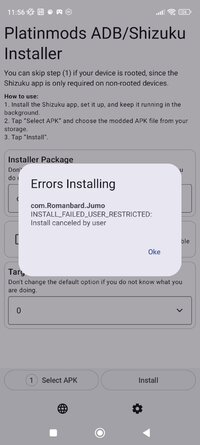
Platinmods ADB/Shizuku Installer App | Android Sideload Restriction Bypass
Use-Cases:
- The app you want to install will only work when installed from the Play Store.
->Installing from a downloaded APK will cause detection, bugs, or missing content in the game.
Notes:- This will not bypass Play Store license protections.
- Yes, it can bypass asset pack download verification of the Play Store.
- Yes, it can bypass the big Android sideload restriction planned for 2027 and coming to some country already now.
➥ If your phone refuses to install any external APK because of security breach, this app will help you.
- You want to install apps via your phone on another phone or Android device in your WiFi network, for example your Android TV or FireStick.
For Rooted Devices:
- Click "Select APK" and find the APK you want to install in your files.
- Click "Install" and enjoy.
For Unrooted Devices:
- You need to activate developer mode on your phone by going to your settings -> about -> Software information. Then click multiple times on "Build Number" and accept to activate developer mode.
- You need the Shizuku app. Have it installed, set up, and running. How to do this is explained in the User manual.
- Install the PMT Shizuku Installer app, select your APK, and install it via the PMT Shizuku installer
*How to install (click the spoilers to read)*
Signed APKs do work on all Android devices (rooted + non-rooted).
Signed APKs are in the most cases the only provided files by the mod publisher as they work for everyone.
1.) Remove the original game/app.
2.) Download the MOD APK.
3.) Install the downloaded MOD APK.
4.) Enjoy.
Regarding login methods, please note that logging in with Google will not be possible when using signed MODs. Facebook login (if available) is possible, but it requires you to remove the Facebook application from your device. Other game-specific login methods (if available), such as email, transfer code or guest login usually work fine.
Notes:
- If you used our MOD APK before and just want to update, you can install the new MOD APK on top of the old without removing the game/app first.
- In-App purchases are not possible on signed APKs as they require Google services similar to the Google login process.
Signed APKs are in the most cases the only provided files by the mod publisher as they work for everyone.
1.) Remove the original game/app.
2.) Download the MOD APK.
3.) Install the downloaded MOD APK.
4.) Enjoy.
Regarding login methods, please note that logging in with Google will not be possible when using signed MODs. Facebook login (if available) is possible, but it requires you to remove the Facebook application from your device. Other game-specific login methods (if available), such as email, transfer code or guest login usually work fine.
Notes:
- If you used our MOD APK before and just want to update, you can install the new MOD APK on top of the old without removing the game/app first.
- In-App purchases are not possible on signed APKs as they require Google services similar to the Google login process.
Unsigned APKs do only work on rooted and patched devices/environments.
These are not always provided by the mod publisher as they do only work under certain circumstances.
1.) Your device must be rooted.
2.) Your device must be patched to ignore app signatures. This can be done with the help of tools such as Luckypatcher or Xposed.
Once you fill that requirements the process is the same as with signed APKs with the difference that you can overwrite the original game/app with the MOD APK without removing it first.
1.) Download the unsigned MOD APK.
2.) Install the unsigned MOD APK.
3.) Enjoy.
Note:
For the case the unsigned APK does fail to install: Your device patch is not done correctly!
Login methods and In-App purchases on unsigned MODs function the same as in the original game. Logging in with Google works without issues. Keeping the Facebook application installed is also no problem.
You are rooted and want to know how to patch your device? Please check this for more information:
[Videotutorial] How To Login With Google+ Or Facebook App On Modded Games
These are not always provided by the mod publisher as they do only work under certain circumstances.
1.) Your device must be rooted.
2.) Your device must be patched to ignore app signatures. This can be done with the help of tools such as Luckypatcher or Xposed.
Once you fill that requirements the process is the same as with signed APKs with the difference that you can overwrite the original game/app with the MOD APK without removing it first.
1.) Download the unsigned MOD APK.
2.) Install the unsigned MOD APK.
3.) Enjoy.
Note:
For the case the unsigned APK does fail to install: Your device patch is not done correctly!
Login methods and In-App purchases on unsigned MODs function the same as in the original game. Logging in with Google works without issues. Keeping the Facebook application installed is also no problem.
You are rooted and want to know how to patch your device? Please check this for more information:
[Videotutorial] How To Login With Google+ Or Facebook App On Modded Games
OBB files are not required by every game/app. If necessary, the mod publisher will usually provide them and tell you that they are needed.
1.) Download the OBB file/files.
2.) Download the MOD APK.
3.) Move the OBB files with the help of a filemanager to Android/obb/<packagecode> on your device.
4.) Install the downloaded MOD APK.
5.) Enjoy.
The OBB files are either provided as ".obb" files or as ".zip" files. ZIP files do require to be extracted first.
Still facing issues? Please check here for more details:
How to install OBB files [as detailed as possible]
1.) Download the OBB file/files.
2.) Download the MOD APK.
3.) Move the OBB files with the help of a filemanager to Android/obb/<packagecode> on your device.
4.) Install the downloaded MOD APK.
5.) Enjoy.
The OBB files are either provided as ".obb" files or as ".zip" files. ZIP files do require to be extracted first.
Still facing issues? Please check here for more details:
How to install OBB files [as detailed as possible]
Free Download:
! Hidden Content !
You must be registered and either click Like under this post or leave a comment before you can see the hidden links.
You may need to refresh the page after clicking Like. If you’re still having trouble revealing the hidden links, please
read this.
Did you know? VIP Members can see all links instantly, no unlocking required.
Interested? Get VIP here.
Interested? Get VIP here.
Tutorials:
How to sign up and download on Platinmods.com
List of useful tutorials about how to use this website and its content
Last edited by a moderator: