

M4KI
I am PLATINMODS!
Playstore Link:
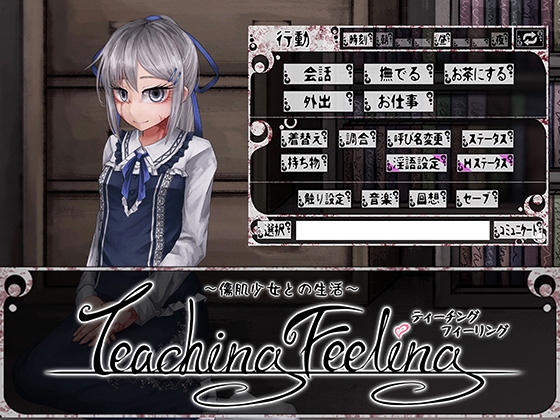
Life With A Sl*ve: Teaching Feeling [FreakilyCharming] | DLsite
At first things were weird. She was naturally distrusting."DLsite Doujin R18" is a download shop for doujinshi, doujin games, doujin voice works and ASMR content. You can immediately download and enjoy products you like! New items appear every day so you're sure to find something for you...
 www.dlsite.com
Game Name: Life With a Slave -Teaching Feeling-
Game Version: Ver. 4.0.6
Needs OBB: No
Needs Root: No
*MOD features*
- English Translation
- Cheated Save
- Gallery Unlocked
- Pre-Patched
- Partially Uncensored
- Paid
1. Download and install Joiplay. Make sure to allow necessary permissions

 platinmods.com
2. Download the .zip game file. There is no password.
platinmods.com
2. Download the .zip game file. There is no password.
3. Extract the .zip file to your chosen file location, I just created a file dedicated to Joiplay games. Again, there is no password.
4. Open Joiplay, and click on the + button on the top right corner, then select "Add Game."
4. Go to the file directory where you extracted the .zip file. Select the Game.exe in the file. Press "Choose."
5. Then just set up the name, version, and thumbnail as you please, and click on the game.
6. Enjoy!
If the Joiplay says "the game requires a run time package," just do this:
6. This game requires a run time package. JoiPlay will redirect you to donwload RPG Maker Run Time Packages. Just download what the game requires
7. Go back to JoiPlay, select the game, and it will promt the same message.
8. Choose "Select" and then select the RPG Maker runtime package you just downloaded. (JoiPlay will automatically install it)
9. Open the game
10. Enjoy!
JoiPlay Ver. 1.21.000 Patreon MOD APK | Paid
Playstore Link: https://www.patreon.com/joiplay *Special Features* 1. Paid Free Download: Hidden content
platinmods.com
3. Extract the .zip file to your chosen file location, I just created a file dedicated to Joiplay games. Again, there is no password.
4. Open Joiplay, and click on the + button on the top right corner, then select "Add Game."
4. Go to the file directory where you extracted the .zip file. Select the Game.exe in the file. Press "Choose."
5. Then just set up the name, version, and thumbnail as you please, and click on the game.
6. Enjoy!
If the Joiplay says "the game requires a run time package," just do this:
6. This game requires a run time package. JoiPlay will redirect you to donwload RPG Maker Run Time Packages. Just download what the game requires
7. Go back to JoiPlay, select the game, and it will promt the same message.
8. Choose "Select" and then select the RPG Maker runtime package you just downloaded. (JoiPlay will automatically install it)
9. Open the game
10. Enjoy!
This seems long but it's really not. Takes less than 2 minutes to do. I just tried to be as detailed as possible. The save file is optional anyway, you don't need it
- Extract the zip file.
- Run the game on joiplay (start a new game) and just skip through the intro.
- Once you are done through the intro, save you progress anywhere.
- Once you have saved once, go to your files.
- Go to the location where you extracted the zip file.
- You will see the game file and folder named "SAVE FILE"
- Copy all the contents of the "SAVE FILE" folder and paste into where your save file is located:
Teaching Feeling v4.0.6/resources/app/storage/ and just keep going until you see the .sav files.
If you don't see any .save files then you are in the wrong directory - Paste the save files there and make sure to press "Replace all" when prompted.
- Relaunch the game on JoiPlay.
Save #1
Save #2
- Just past the start of the game so you don't accidentally kill her...
- Contains:
- Intimacy: 2000+
Save #2
- Full Save
- Contains:
- All Memories unlocked
- Intimacy: 2000+
- Lust: 1000+
- Pink Flower: 1000 (can be used to make her horny)
So yeah, this version is still only partiall uncensored, meaning only some scenes are uncensored. Here is a list for reference:
Uncensored Scenes:
Uncensored Scenes:
- First Time
- Longing
- Can't Wait
- Hysteria
- Masturbation 1-2
- Nurse 1-2
- Missionary
- Drunk 1-2
- Kitchen 1-3
- Outdoors 1-3
- Blowjob 1-3
- Yep. The X button doesn't work. So make sure you save whenever you can incase you mistakenly click the "load" button during gameplay
- I notice sometimes an error arises, but it can be skipped or ignored. If you encounter some, you can message me privately with as much info as you can, or you can @ me in this thread
IMPORTANT NOTE:
- Now, before you @ me, make sure you have read all the spoilers above, and you have followed the instructions to a T.
- No, there is no password
Credit to: FreakilyCharming
Free Download:
! Hidden Content !
You must be registered and either click Like under this post or leave a comment before you can see the hidden links.
You may need to refresh the page after clicking Like. If you’re still having trouble revealing the hidden links, please
read this.
Did you know? VIP Members can see all links instantly, no unlocking required.
Interested? Get VIP here.
Interested? Get VIP here.
______________________________________
If credits are unknown or incorrect and you are the modder you are free to message @G-Bo and the credits will be corrected asap!
What you need to know about Shared-MODs
*How to install (click the spoilers to read)*
Signed APKs do work on all Android devices (rooted + non-rooted).
Signed APKs are in the most cases the only provided files by the mod publisher as they work for everyone.
1.) Remove the original game/app.
2.) Download the MOD APK.
3.) Install the downloaded MOD APK.
4.) Enjoy.
Regarding login methods, please note that logging in with Google will not be possible when using signed MODs. Facebook login (if available) is possible, but it requires you to remove the Facebook application from your device. Other game-specific login methods (if available), such as email, transfer code or guest login usually work fine.
Notes:
- If you used our MOD APK before and just want to update, you can install the new MOD APK on top of the old without removing the game/app first.
- In-App purchases are not possible on signed APKs as they require Google services similar to the Google login process.
Signed APKs are in the most cases the only provided files by the mod publisher as they work for everyone.
1.) Remove the original game/app.
2.) Download the MOD APK.
3.) Install the downloaded MOD APK.
4.) Enjoy.
Regarding login methods, please note that logging in with Google will not be possible when using signed MODs. Facebook login (if available) is possible, but it requires you to remove the Facebook application from your device. Other game-specific login methods (if available), such as email, transfer code or guest login usually work fine.
Notes:
- If you used our MOD APK before and just want to update, you can install the new MOD APK on top of the old without removing the game/app first.
- In-App purchases are not possible on signed APKs as they require Google services similar to the Google login process.
Unsigned APKs do only work on rooted and patched devices/environments.
These are not always provided by the mod publisher as they do only work under certain circumstances.
1.) Your device must be rooted.
2.) Your device must be patched to ignore app signatures. This can be done with the help of tools such as Luckypatcher or Xposed.
Once you fill that requirements the process is the same as with signed APKs with the difference that you can overwrite the original game/app with the MOD APK without removing it first.
1.) Download the unsigned MOD APK.
2.) Install the unsigned MOD APK.
3.) Enjoy.
Note:
For the case the unsigned APK does fail to install: Your device patch is not done correctly!
Login methods and In-App purchases on unsigned MODs function the same as in the original game. Logging in with Google works without issues. Keeping the Facebook application installed is also no problem.
You are rooted and want to know how to patch your device? Please check this for more information:
[Videotutorial] How To Login With Google+ Or Facebook App On Modded Games
These are not always provided by the mod publisher as they do only work under certain circumstances.
1.) Your device must be rooted.
2.) Your device must be patched to ignore app signatures. This can be done with the help of tools such as Luckypatcher or Xposed.
Once you fill that requirements the process is the same as with signed APKs with the difference that you can overwrite the original game/app with the MOD APK without removing it first.
1.) Download the unsigned MOD APK.
2.) Install the unsigned MOD APK.
3.) Enjoy.
Note:
For the case the unsigned APK does fail to install: Your device patch is not done correctly!
Login methods and In-App purchases on unsigned MODs function the same as in the original game. Logging in with Google works without issues. Keeping the Facebook application installed is also no problem.
You are rooted and want to know how to patch your device? Please check this for more information:
[Videotutorial] How To Login With Google+ Or Facebook App On Modded Games
OBB files are not required by every game/app. If necessary, the mod publisher will usually provide them and tell you that they are needed.
1.) Download the OBB file/files.
2.) Download the MOD APK.
3.) Move the OBB files with the help of a filemanager to Android/obb/<packagecode> on your device.
4.) Install the downloaded MOD APK.
5.) Enjoy.
The OBB files are either provided as ".obb" files or as ".zip" files. ZIP files do require to be extracted first.
Still facing issues? Please check here for more details:
How to install OBB files [as detailed as possible]
1.) Download the OBB file/files.
2.) Download the MOD APK.
3.) Move the OBB files with the help of a filemanager to Android/obb/<packagecode> on your device.
4.) Install the downloaded MOD APK.
5.) Enjoy.
The OBB files are either provided as ".obb" files or as ".zip" files. ZIP files do require to be extracted first.
Still facing issues? Please check here for more details:
How to install OBB files [as detailed as possible]
Tutorials:
How to sign up and download on Platinmods.com
List of useful tutorials about how to use this website and its content


