Playstore Link:

Merge Quest: Idle RPG - Apps on Google Play
Merge allies, craft epic gear, and lead your army in this addictive IDLE RPG!
Game Name: Merge Quest: Idle RPG
Game Version: 1.0.1
Needs OBB: No
Needs Root: No
Prepare for the ultimate battle in Merge Quest: IDLE RPG!
Combine the addictive mechanics of Merge games with the strategic depth of a classic Role-Playing Game. Build a powerful army, equip your Hero, and conquer endless waves of enemies—even while you are AFK!
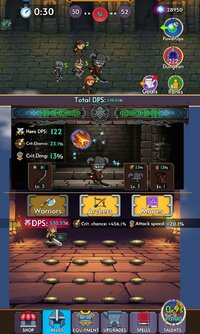
 MERGE YOUR ARMY
Recruit and merge three types of allies, each with unique Team Auras to boost your squad:
Warriors: Deal massive damage in the front lines.
Archers: Boost the Crit Chance for your entire team.
Mages: Increase the Attack Speed of all allies. Strategize your formation to maximize your DPS!
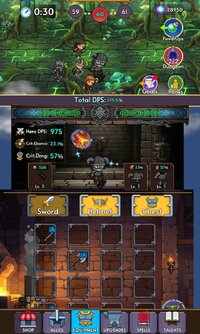
 EQUIP YOUR HERO
Your Hero is the commander of the battlefield. Merge equipment to craft legendary gear:
Weapons: To crush enemies with high Damage.
Helmets: To increase your Critical Strike chance.
Armor: To boost Critical Damage multiplier.
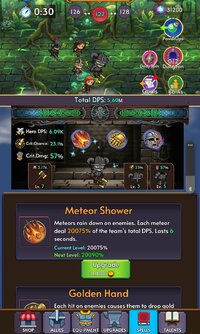
 EPIC SKILLS & TALENTS
Unleash devastating Active Skills like Meteor Shower, Acid Rain, and Supernova to wipe out waves.
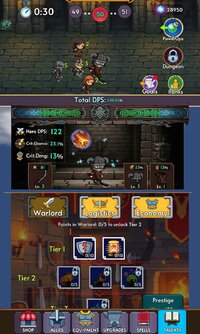
Earn Prestige to reset your progress and gain Talent Points.
Upgrade the extensive Talent Tree to become permanently stronger!
GAME FEATURES:
★ Infinite Progression: Defeat endless waves and fight powerful Bosses.
★ Gold Dungeons: Test your DPS in special time-limited modes.
★ Offline Rewards: Your army fights for you! Earn Gold while you sleep.
★ Deep Upgrades: Invest in Camp upgrades, decrease cooldowns, and expand your army size.
Download Merge Quest: IDLE RPG now and start your legendary adventure!
Combine the addictive mechanics of Merge games with the strategic depth of a classic Role-Playing Game. Build a powerful army, equip your Hero, and conquer endless waves of enemies—even while you are AFK!
MERGE YOUR ARMY Recruit and merge three types of allies, each with unique Team Auras to boost your squad:
Warriors: Deal massive damage in the front lines.
Archers: Boost the Crit Chance for your entire team.
Mages: Increase the Attack Speed of all allies. Strategize your formation to maximize your DPS!
EQUIP YOUR HERO Your Hero is the commander of the battlefield. Merge equipment to craft legendary gear:
Weapons: To crush enemies with high Damage.
Helmets: To increase your Critical Strike chance.
Armor: To boost Critical Damage multiplier.
EPIC SKILLS & TALENTS Unleash devastating Active Skills like Meteor Shower, Acid Rain, and Supernova to wipe out waves.
Earn Prestige to reset your progress and gain Talent Points.
Upgrade the extensive Talent Tree to become permanently stronger!
GAME FEATURES:
★ Infinite Progression: Defeat endless waves and fight powerful Bosses.
★ Gold Dungeons: Test your DPS in special time-limited modes.
★ Offline Rewards: Your army fights for you! Earn Gold while you sleep.
★ Deep Upgrades: Invest in Camp upgrades, decrease cooldowns, and expand your army size.
Download Merge Quest: IDLE RPG now and start your legendary adventure!
*MOD Features*
1. High Gold & Crystal Gain (Gold is not shown on UI, but you can spend infinitely ^^)
2. Currencies Never Reduce
3. No Skill Cooldown (can spam, tested in dungeons where you can spam them)
Note: Check first if it supports your device on Playstore. It didn't supported my emulator. Tested on Samsung Galaxy Tab A7.
Stay away from harmful malicious mods that fill your device with UNWANTED ADS! I always provide quality service with no such malicious tricks to earn money. We want you happy, that's our goal. You can be sure to download quality on platinmods.com.
*How to install (click the spoilers to read)*
Signed APKs do work on all Android devices (rooted + non-rooted).
Signed APKs are in the most cases the only provided files by the mod publisher as they work for everyone.
1.) Remove the original game/app.
2.) Download the MOD APK.
3.) Install the downloaded MOD APK.
4.) Enjoy.
Regarding login methods, please note that logging in with Google will not be possible when using signed MODs. Facebook login (if available) is possible, but it requires you to remove the Facebook application from your device. Other game-specific login methods (if available), such as email, transfer code or guest login usually work fine.
Notes:
- If you used our MOD APK before and just want to update, you can install the new MOD APK on top of the old without removing the game/app first.
- In-App purchases are not possible on signed APKs as they require Google services similar to the Google login process.
Signed APKs are in the most cases the only provided files by the mod publisher as they work for everyone.
1.) Remove the original game/app.
2.) Download the MOD APK.
3.) Install the downloaded MOD APK.
4.) Enjoy.
Regarding login methods, please note that logging in with Google will not be possible when using signed MODs. Facebook login (if available) is possible, but it requires you to remove the Facebook application from your device. Other game-specific login methods (if available), such as email, transfer code or guest login usually work fine.
Notes:
- If you used our MOD APK before and just want to update, you can install the new MOD APK on top of the old without removing the game/app first.
- In-App purchases are not possible on signed APKs as they require Google services similar to the Google login process.
Unsigned APKs do only work on rooted and patched devices/environments.
These are not always provided by the mod publisher as they do only work under certain circumstances.
1.) Your device must be rooted.
2.) Your device must be patched to ignore app signatures. This can be done with the help of tools such as Luckypatcher or Xposed.
Once you fill that requirements the process is the same as with signed APKs with the difference that you can overwrite the original game/app with the MOD APK without removing it first.
1.) Download the unsigned MOD APK.
2.) Install the unsigned MOD APK.
3.) Enjoy.
Note:
For the case the unsigned APK does fail to install: Your device patch is not done correctly!
Login methods and In-App purchases on unsigned MODs function the same as in the original game. Logging in with Google works without issues. Keeping the Facebook application installed is also no problem.
You are rooted and want to know how to patch your device? Please check this for more information:
[Videotutorial] How To Login With Google+ Or Facebook App On Modded Games
These are not always provided by the mod publisher as they do only work under certain circumstances.
1.) Your device must be rooted.
2.) Your device must be patched to ignore app signatures. This can be done with the help of tools such as Luckypatcher or Xposed.
Once you fill that requirements the process is the same as with signed APKs with the difference that you can overwrite the original game/app with the MOD APK without removing it first.
1.) Download the unsigned MOD APK.
2.) Install the unsigned MOD APK.
3.) Enjoy.
Note:
For the case the unsigned APK does fail to install: Your device patch is not done correctly!
Login methods and In-App purchases on unsigned MODs function the same as in the original game. Logging in with Google works without issues. Keeping the Facebook application installed is also no problem.
You are rooted and want to know how to patch your device? Please check this for more information:
[Videotutorial] How To Login With Google+ Or Facebook App On Modded Games
OBB files are not required by every game/app. If necessary, the mod publisher will usually provide them and tell you that they are needed.
1.) Download the OBB file/files.
2.) Download the MOD APK.
3.) Move the OBB files with the help of a filemanager to Android/obb/<packagecode> on your device.
4.) Install the downloaded MOD APK.
5.) Enjoy.
The OBB files are either provided as ".obb" files or as ".zip" files. ZIP files do require to be extracted first.
Still facing issues? Please check here for more details:
How to install OBB files [as detailed as possible]
1.) Download the OBB file/files.
2.) Download the MOD APK.
3.) Move the OBB files with the help of a filemanager to Android/obb/<packagecode> on your device.
4.) Install the downloaded MOD APK.
5.) Enjoy.
The OBB files are either provided as ".obb" files or as ".zip" files. ZIP files do require to be extracted first.
Still facing issues? Please check here for more details:
How to install OBB files [as detailed as possible]
Free Download:
! Hidden Content !
You must be registered and either click Like under this post or leave a comment before you can see the hidden links.
You may need to refresh the page after clicking Like. If you’re still having trouble revealing the hidden links, please
read this.
Did you know? VIP Members can see all links instantly, no unlocking required.
Interested? Get VIP here.
Interested? Get VIP here.
Tutorials:
How to sign up and download on Platinmods.com
List of useful tutorials about how to use this website and its content
Last edited by a moderator: