GeoLancer
Solid & Active Platinian
APKCombo Link:
https://apkcombo.com/n-o-v-a-2-hd/com.gameloft.android.ANMP.GloftN2HM/
Game Name: N.O.V.A. 2 HD
Game Version: v1.0.5
Needs OBB: No
Needs Root: No
*MOD Features*
1. Android 13 Support
2. Widescreen Support (go to your phone settings and set the game to fullscreen)
3. Hard Difficulty Unlocked (completed the game on this difficulty as well)
4. New Game+ In Hard Difficulty Ready To Be Played via "Continue" option from main menu (feel free to select New Game on any difficulty since you will still have all of your upgrades, Credits, and achievements)
5. All Missions Unlocked
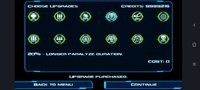
6. All Upgrades bought & activated (you will only see the full list of upgrades and their effects every time you complete a mission)
7. Unlimited Credits (9,999,999) (again, you will only see your total Credits every time you complete a mission)
8. All Achievements Completed (including the secret "Boss Of N.O.V.A. 2" achievement) EXCEPT for the following two (2):
- "Mister Bullet" achievement from the mission "Under Pressure" = it's bugged since hacking & opening all ammo boxes in this mission still won't unlock the achievement
- "Awakened" achievement from the mission "Inner Hell" = it doesn't tell you what you need to do to complete it as it is all marked with "?????" + no info about it anywhere either (though my ideas on how to possibly complete this are stated below)
9. Includes A Walkthrough Video Of The Entire Final Mission (highly recommended for people beating this game for the very first time in order to save you a lot of time, especially on the 3-portal maze and the final boss fight)
INSTALLATION
1. Install apk file.
2. Place the "gameloft" folder to your sdcard / internal memory (NOT Android / data or Android / obb).
3. Done!
HOW TO RUN THE GAME
1. Open the game and watch the Gameloft logo video.
2. After that, it will immediately play the pre-rendered preview cutscene for the game. You can either watch the whole thing or you can skip it.
3. Now comes the important step; after you see a black screen, press your phone's home button multiple times until it minimizes the game window and then go back into the game by selecting the minimized game. You need to do this step every time you run the game.
4. Done!
NOTE - Here are some gameplay tips and other helpful info that you need to know:
- In Options > Advanced, keep the Aim Assist option as High & Auto Leveling to OFF. Trust me; you will need these to make the gameplay smooth and so much more enjoyable.
- In order to complete the elusive "Awakened" achievement from the mission "Inner Hell", my best guess is that you need to:
- Complete the entire mission without dying / restarting checkpoint / restarting level (this is difficult to do on Normal & Hard Difficulty so create a New Game in Easy Difficulty if you plan on doing this. You CANNOT get this achievement via playing "Levels" and selecting the "Inner Hell" mission.)
- Successfully escape the 3-portal maze without making a mistake and returning to the starting point (hint: once you arrive there, go straight to the middle portal, then right, then left, then right, then right again, then finally left. You should end up facing the final boss in the same room for the 2nd & final time.)
- Try your best not to "Restart Level" too many times on the same mission, especially on the "Ring Of The Apocalypse" mission. There's an official unfixable bug where if you do this, there's a decent chance that you will end up back at the starting point of the mission once you get to an area of a mission with a necessary "Loading..." sequence in order to continue through the mission. This only happened on the "Ring Of The Apocalypse" mission in my testing but it's best to play it safe and assume that this can happen to any mission in general.
- When you start a new mission or restart checkpoint, the dual pistol ammo clip upgrade (increasing your ammo clip from 16 bullets to 19 bullets) will sometimes revert back to the default 16-bullet clip inspite of the upgrade being active. This is a rather unfixable but minor bug but I just want you to be aware of it.
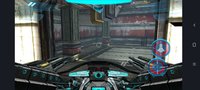
- The driving sections in both "Payday" & "Hot Temper" missions requires you to tilt your phone left or right in order to steer & control your vehicle towards a certain direction. Tap the crosshair in the middle repeatedly to fire the vehicle's weapons.
- Though you can select a specific mission you want to play via "Levels" from the main menu, I don't recommend playing any mission from there because all of your upgrades will NOT take effect there + you won't have the supposed weapons & abilities that you should have at that point of the game.
Credit to:
tehcno (adding Android 13 Support)
Rick Grimes (walkthrough video)
Free Download:
! Hidden Content !
You must be registered and either click Like under this post or leave a comment before you can see the hidden links.
You may need to refresh the page after clicking Like. If you’re still having trouble revealing the hidden links, please
read this.
Did you know? VIP Members can see all links instantly, no unlocking required.
Interested? Get VIP here.
Interested? Get VIP here.
______________________________________
If credits are unknown or incorrect and you are the modder you are free to message @G-Bo and the credits will be corrected asap!
What you need to know about Shared-MODs
*How to install (click the spoilers to read)*
Signed APKs do work on all Android devices (rooted + non-rooted).
Signed APKs are in the most cases the only provided files by the mod publisher as they work for everyone.
1.) Remove the original game/app.
2.) Download the MOD APK.
3.) Install the downloaded MOD APK.
4.) Enjoy.
Regarding login methods, please note that logging in with Google will not be possible when using signed MODs. Facebook login (if available) is possible, but it requires you to remove the Facebook application from your device. Other game-specific login methods (if available), such as email, transfer code or guest login usually work fine.
Notes:
- If you used our MOD APK before and just want to update, you can install the new MOD APK on top of the old without removing the game/app first.
- In-App purchases are not possible on signed APKs as they require Google services similar to the Google login process.
Signed APKs are in the most cases the only provided files by the mod publisher as they work for everyone.
1.) Remove the original game/app.
2.) Download the MOD APK.
3.) Install the downloaded MOD APK.
4.) Enjoy.
Regarding login methods, please note that logging in with Google will not be possible when using signed MODs. Facebook login (if available) is possible, but it requires you to remove the Facebook application from your device. Other game-specific login methods (if available), such as email, transfer code or guest login usually work fine.
Notes:
- If you used our MOD APK before and just want to update, you can install the new MOD APK on top of the old without removing the game/app first.
- In-App purchases are not possible on signed APKs as they require Google services similar to the Google login process.
Unsigned APKs do only work on rooted and patched devices/environments.
These are not always provided by the mod publisher as they do only work under certain circumstances.
1.) Your device must be rooted.
2.) Your device must be patched to ignore app signatures. This can be done with the help of tools such as Luckypatcher or Xposed.
Once you fill that requirements the process is the same as with signed APKs with the difference that you can overwrite the original game/app with the MOD APK without removing it first.
1.) Download the unsigned MOD APK.
2.) Install the unsigned MOD APK.
3.) Enjoy.
Note:
For the case the unsigned APK does fail to install: Your device patch is not done correctly!
Login methods and In-App purchases on unsigned MODs function the same as in the original game. Logging in with Google works without issues. Keeping the Facebook application installed is also no problem.
You are rooted and want to know how to patch your device? Please check this for more information:
[Videotutorial] How To Login With Google+ Or Facebook App On Modded Games
These are not always provided by the mod publisher as they do only work under certain circumstances.
1.) Your device must be rooted.
2.) Your device must be patched to ignore app signatures. This can be done with the help of tools such as Luckypatcher or Xposed.
Once you fill that requirements the process is the same as with signed APKs with the difference that you can overwrite the original game/app with the MOD APK without removing it first.
1.) Download the unsigned MOD APK.
2.) Install the unsigned MOD APK.
3.) Enjoy.
Note:
For the case the unsigned APK does fail to install: Your device patch is not done correctly!
Login methods and In-App purchases on unsigned MODs function the same as in the original game. Logging in with Google works without issues. Keeping the Facebook application installed is also no problem.
You are rooted and want to know how to patch your device? Please check this for more information:
[Videotutorial] How To Login With Google+ Or Facebook App On Modded Games
OBB files are not required by every game/app. If necessary, the mod publisher will usually provide them and tell you that they are needed.
1.) Download the OBB file/files.
2.) Download the MOD APK.
3.) Move the OBB files with the help of a filemanager to Android/obb/<packagecode> on your device.
4.) Install the downloaded MOD APK.
5.) Enjoy.
The OBB files are either provided as ".obb" files or as ".zip" files. ZIP files do require to be extracted first.
Still facing issues? Please check here for more details:
How to install OBB files [as detailed as possible]
1.) Download the OBB file/files.
2.) Download the MOD APK.
3.) Move the OBB files with the help of a filemanager to Android/obb/<packagecode> on your device.
4.) Install the downloaded MOD APK.
5.) Enjoy.
The OBB files are either provided as ".obb" files or as ".zip" files. ZIP files do require to be extracted first.
Still facing issues? Please check here for more details:
How to install OBB files [as detailed as possible]
Tutorials:
How to sign up and download on Platinmods.com
List of useful tutorials about how to use this website and its content
Last edited by a moderator: