Playstore Link:

Nuke Em All 2 - Apps on Google Play
Ultimate Nuclear Bomb Blast simulator in dangerous and hostile war environment
Game Name: Nuke Em All 2
Game Version: 3.3.1
Needs OBB: No
Needs Root: No
Your mission is to destroy Everything scattered across the landscape! Kill everyone on the TOP SECRET hit-list, which is updated month to month! Drop Nukes to wipeout a larger area and become an accurate bomber to kill and cross off people on your most wanted list! You can also rescue some VIP commandos scattered across the desert terrain...
ULTIMATE NUKE SIMULATION ★
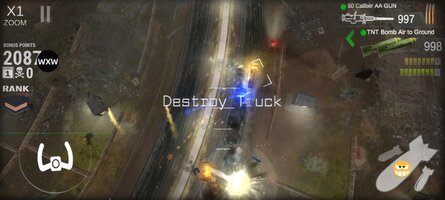
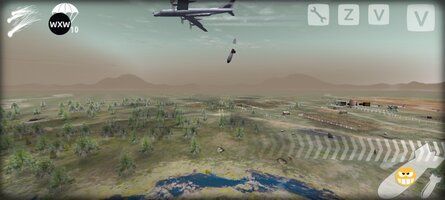
Screenshots are from gameplay...
STRATEGIC DECISIONS ★
Know when to use the right weapons for the task at hand! Use Army and Special forces to collect ammo
MEMORY GAME ★
Use classified spy intelligence and memory to remember which target locations you have already bombed
Use landmarks and roads to navigate the real time strategy landscape map
ENEMY HITLIST ★
Find and hunt down your enemies in the desert, industrial zones, cities, wastelands and no mans land... Use the battlefield to test new weapons, assault and eliminate your enemies! Turn the desert into a nuclear winter! No survivors happy hunting!
Bombs, Nukes are armed and ready...
Destroy Cities for high kill numbers, Get Credits from the government to order more weapons, super weapons, space weapons and supplies for your atomic bomber, enjoy huge explosions and inferno fireballs from nuclear tests!
THE RESISTANCE ★
Be careful - you are not invincible on the battlefield! There are airfields, ww1, ww2 tanks, AA anti-aircraft guns, Drones, helicopters, ICBM missiles and other military units and targets that wanna blow you out of the sky! Earn Medals and Awards!
Download now while radiation levels are high!
Free weapons supplied to start you off on your mission!
This is a game! No to war! Yes to Peace!!!!
ULTIMATE NUKE SIMULATION ★
Screenshots are from gameplay...
STRATEGIC DECISIONS ★
Know when to use the right weapons for the task at hand! Use Army and Special forces to collect ammo
MEMORY GAME ★
Use classified spy intelligence and memory to remember which target locations you have already bombed
Use landmarks and roads to navigate the real time strategy landscape map
ENEMY HITLIST ★
Find and hunt down your enemies in the desert, industrial zones, cities, wastelands and no mans land... Use the battlefield to test new weapons, assault and eliminate your enemies! Turn the desert into a nuclear winter! No survivors happy hunting!
Bombs, Nukes are armed and ready...
Destroy Cities for high kill numbers, Get Credits from the government to order more weapons, super weapons, space weapons and supplies for your atomic bomber, enjoy huge explosions and inferno fireballs from nuclear tests!
THE RESISTANCE ★
Be careful - you are not invincible on the battlefield! There are airfields, ww1, ww2 tanks, AA anti-aircraft guns, Drones, helicopters, ICBM missiles and other military units and targets that wanna blow you out of the sky! Earn Medals and Awards!
Download now while radiation levels are high!
Free weapons supplied to start you off on your mission!
This is a game! No to war! Yes to Peace!!!!
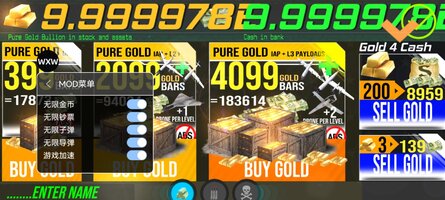
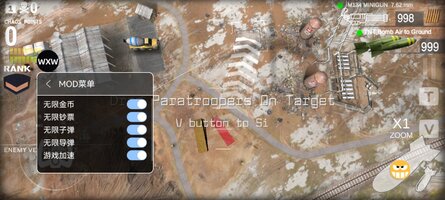
*MOD Features*
Mod Menu:
1. Unlimited Gold Coins (Click the button to obtain)
2. Unlimited Cash (Click the button to obtain)
3. Unlimited Bullets (Click the button to purchase bullets in the shop)
4. Unlimited Missiles (Click the button to use missiles in battle)
5. Increased Game Speed
Free Download:
______________________________________
If credits are unknown or incorrect and you are the modder you are free to message @G-Bo and the credits will be corrected asap!
What you need to know about Shared-MODs
*How to install (click the spoilers to read)*
Signed APKs do work on all Android devices (rooted + non-rooted).
Signed APKs are in the most cases the only provided files by the mod publisher as they work for everyone.
1.) Remove the original game/app.
2.) Download the MOD APK.
3.) Install the downloaded MOD APK.
4.) Enjoy.
Regarding login methods, please note that logging in with Google will not be possible when using signed MODs. Facebook login (if available) is possible, but it requires you to remove the Facebook application from your device. Other game-specific login methods (if available), such as email, transfer code or guest login usually work fine.
Notes:
- If you used our MOD APK before and just want to update, you can install the new MOD APK on top of the old without removing the game/app first.
- In-App purchases are not possible on signed APKs as they require Google services similar to the Google login process.
Signed APKs are in the most cases the only provided files by the mod publisher as they work for everyone.
1.) Remove the original game/app.
2.) Download the MOD APK.
3.) Install the downloaded MOD APK.
4.) Enjoy.
Regarding login methods, please note that logging in with Google will not be possible when using signed MODs. Facebook login (if available) is possible, but it requires you to remove the Facebook application from your device. Other game-specific login methods (if available), such as email, transfer code or guest login usually work fine.
Notes:
- If you used our MOD APK before and just want to update, you can install the new MOD APK on top of the old without removing the game/app first.
- In-App purchases are not possible on signed APKs as they require Google services similar to the Google login process.
Unsigned APKs do only work on rooted and patched devices/environments.
These are not always provided by the mod publisher as they do only work under certain circumstances.
1.) Your device must be rooted.
2.) Your device must be patched to ignore app signatures. This can be done with the help of tools such as Luckypatcher or Xposed.
Once you fill that requirements the process is the same as with signed APKs with the difference that you can overwrite the original game/app with the MOD APK without removing it first.
1.) Download the unsigned MOD APK.
2.) Install the unsigned MOD APK.
3.) Enjoy.
Note:
For the case the unsigned APK does fail to install: Your device patch is not done correctly!
Login methods and In-App purchases on unsigned MODs function the same as in the original game. Logging in with Google works without issues. Keeping the Facebook application installed is also no problem.
You are rooted and want to know how to patch your device? Please check this for more information:
[Videotutorial] How To Login With Google+ Or Facebook App On Modded Games
These are not always provided by the mod publisher as they do only work under certain circumstances.
1.) Your device must be rooted.
2.) Your device must be patched to ignore app signatures. This can be done with the help of tools such as Luckypatcher or Xposed.
Once you fill that requirements the process is the same as with signed APKs with the difference that you can overwrite the original game/app with the MOD APK without removing it first.
1.) Download the unsigned MOD APK.
2.) Install the unsigned MOD APK.
3.) Enjoy.
Note:
For the case the unsigned APK does fail to install: Your device patch is not done correctly!
Login methods and In-App purchases on unsigned MODs function the same as in the original game. Logging in with Google works without issues. Keeping the Facebook application installed is also no problem.
You are rooted and want to know how to patch your device? Please check this for more information:
[Videotutorial] How To Login With Google+ Or Facebook App On Modded Games
OBB files are not required by every game/app. If necessary, the mod publisher will usually provide them and tell you that they are needed.
1.) Download the OBB file/files.
2.) Download the MOD APK.
3.) Move the OBB files with the help of a filemanager to Android/obb/<packagecode> on your device.
4.) Install the downloaded MOD APK.
5.) Enjoy.
The OBB files are either provided as ".obb" files or as ".zip" files. ZIP files do require to be extracted first.
Still facing issues? Please check here for more details:
How to install OBB files [as detailed as possible]
1.) Download the OBB file/files.
2.) Download the MOD APK.
3.) Move the OBB files with the help of a filemanager to Android/obb/<packagecode> on your device.
4.) Install the downloaded MOD APK.
5.) Enjoy.
The OBB files are either provided as ".obb" files or as ".zip" files. ZIP files do require to be extracted first.
Still facing issues? Please check here for more details:
How to install OBB files [as detailed as possible]
Tutorials:
How to sign up and download on Platinmods.com
List of useful tutorials about how to use this website and its content