Playstore Link:

심연의 아네 키우기 - Apps on Google Play
Idle育成 RPG. Grow Abyss Ane and conquer Dungeons, World Bosses, and Arenas.
Game Name: Raising Ane of the Abyss / 심연의 아네 키우기
Game Version: 1.0
Needs OBB: No
Needs Root: No
 Ane, awakened from the abyss, becomes the strongest at your fingertips!
[Raising Ane of the Abyss] is an idle-style育成 RPG designed for busy people like you. Even if you are not logged in, Ane hunts monsters and grows on her own, delivering generous offline rewards when you return. Whether you play briefly or delve deep into the game, the fun of growth never ends!
▣ Growing Fast Without Touching! Idle Growth
Huntie monsters with auto-battle and become stronger in an instant using offline rewards accumulated while you are away. You can enjoy it casually anytime.
▣ Endless Stage Challenges
Break through stages by fighting against ever-increasing monsters. The stronger you become, the deeper the abyss opens up.
▣ In-depth Character Development
Strengthen your fundamentals with stat and trait enhancements
Maximize your combat power by equipping weapons, armor, and gloves
Customize your own Ane with costumes and earn unique bonuses.
▣ Spectacular Skills and Relics
Learn and enhance various skills to dominate the battlefield. Collecting and enhancing rare artifacts will cause your combat power to skyrocket.
▣ New Power Through Summoning
Summon weapons, armor, and gloves to acquire more powerful equipment. You can challenge with peace of mind thanks to the pity system.
▣ Abundant Content
Dungeons
Gold Dungeon · Experience Dungeon · Equipment Dungeon · Skill Dungeon
Choose the resources you need and focus on farming! Up to double rewards for your first clear.
▣ The Thrill of Competitive Content
World Boss: Challenge giant bosses with users from all servers and aim for weekly ranking rewards.
Arena: Compete against other users to reach the top of the season rankings.
▣ More Fun Together
Communicate with other adventurers via real-time chat, and there are plenty of reasons to log in every day with attendance rewards, quests, and the mailbox.
Awaken Ane of the Abyss right now and experience ultimate growth!
※ This game includes some paid items (in-app purchases).
*MOD Features*
>Damage Multiplier
>Defense Multiplier
>God Mode
>Currency
Stay away from harmful malicious mods that fill your device with UNWANTED ADS! I always provide quality service with no such malicious tricks to earn money. We want you happy, that's our goal. You can be sure to download quality on platinmods.com.
*How to install (click the spoilers to read)*
Signed APKs do work on all Android devices (rooted + non-rooted).
Signed APKs are in the most cases the only provided files by the mod publisher as they work for everyone.
1.) Remove the original game/app.
2.) Download the MOD APK.
3.) Install the downloaded MOD APK.
4.) Enjoy.
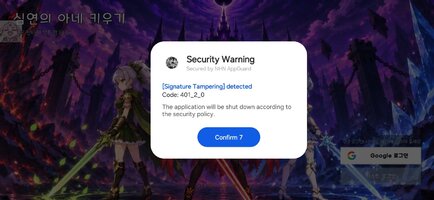
Regarding login methods, please note that logging in with Google will not be possible when using signed MODs. Facebook login (if available) is possible, but it requires you to remove the Facebook application from your device. Other game-specific login methods (if available), such as email, transfer code or guest login usually work fine.
Notes:
- If you used our MOD APK before and just want to update, you can install the new MOD APK on top of the old without removing the game/app first.
- In-App purchases are not possible on signed APKs as they require Google services similar to the Google login process.
Signed APKs are in the most cases the only provided files by the mod publisher as they work for everyone.
1.) Remove the original game/app.
2.) Download the MOD APK.
3.) Install the downloaded MOD APK.
4.) Enjoy.
Regarding login methods, please note that logging in with Google will not be possible when using signed MODs. Facebook login (if available) is possible, but it requires you to remove the Facebook application from your device. Other game-specific login methods (if available), such as email, transfer code or guest login usually work fine.
Notes:
- If you used our MOD APK before and just want to update, you can install the new MOD APK on top of the old without removing the game/app first.
- In-App purchases are not possible on signed APKs as they require Google services similar to the Google login process.
Unsigned APKs do only work on rooted and patched devices/environments.
These are not always provided by the mod publisher as they do only work under certain circumstances.
1.) Your device must be rooted.
2.) Your device must be patched to ignore app signatures. This can be done with the help of tools such as Luckypatcher or Xposed.
Once you fill that requirements the process is the same as with signed APKs with the difference that you can overwrite the original game/app with the MOD APK without removing it first.
1.) Download the unsigned MOD APK.
2.) Install the unsigned MOD APK.
3.) Enjoy.
Note:
For the case the unsigned APK does fail to install: Your device patch is not done correctly!
Login methods and In-App purchases on unsigned MODs function the same as in the original game. Logging in with Google works without issues. Keeping the Facebook application installed is also no problem.
You are rooted and want to know how to patch your device? Please check this for more information:
[Videotutorial] How To Login With Google+ Or Facebook App On Modded Games
These are not always provided by the mod publisher as they do only work under certain circumstances.
1.) Your device must be rooted.
2.) Your device must be patched to ignore app signatures. This can be done with the help of tools such as Luckypatcher or Xposed.
Once you fill that requirements the process is the same as with signed APKs with the difference that you can overwrite the original game/app with the MOD APK without removing it first.
1.) Download the unsigned MOD APK.
2.) Install the unsigned MOD APK.
3.) Enjoy.
Note:
For the case the unsigned APK does fail to install: Your device patch is not done correctly!
Login methods and In-App purchases on unsigned MODs function the same as in the original game. Logging in with Google works without issues. Keeping the Facebook application installed is also no problem.
You are rooted and want to know how to patch your device? Please check this for more information:
[Videotutorial] How To Login With Google+ Or Facebook App On Modded Games
OBB files are not required by every game/app. If necessary, the mod publisher will usually provide them and tell you that they are needed.
1.) Download the OBB file/files.
2.) Download the MOD APK.
3.) Move the OBB files with the help of a filemanager to Android/obb/<packagecode> on your device.
4.) Install the downloaded MOD APK.
5.) Enjoy.
The OBB files are either provided as ".obb" files or as ".zip" files. ZIP files do require to be extracted first.
Still facing issues? Please check here for more details:
How to install OBB files [as detailed as possible]
1.) Download the OBB file/files.
2.) Download the MOD APK.
3.) Move the OBB files with the help of a filemanager to Android/obb/<packagecode> on your device.
4.) Install the downloaded MOD APK.
5.) Enjoy.
The OBB files are either provided as ".obb" files or as ".zip" files. ZIP files do require to be extracted first.
Still facing issues? Please check here for more details:
How to install OBB files [as detailed as possible]
Free Download:
! Hidden Content !
You must be registered and either click Like under this post or leave a comment before you can see the hidden links.
You may need to refresh the page after clicking Like. If you’re still having trouble revealing the hidden links, please
read this.
Did you know? VIP Members can see all links instantly, no unlocking required.
Interested? Get VIP here.
Interested? Get VIP here.
Tutorials:
How to sign up and download on Platinmods.com
List of useful tutorials about how to use this website and its content