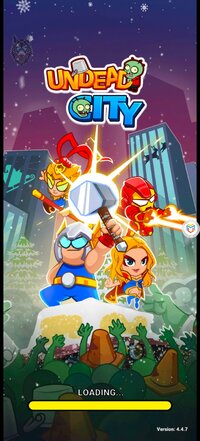
Playstore Link:

Undead City: Zombie Survivor - Apps on Google Play
Get ready for epic battles between heroes and zombies. Be the last survivor!
Game Name: Undead City: Zombie Survivor
Game Version: 4.4.7
Needs OBB: No
Needs Root: No
Architecture: arm64
Lots of zombies are attacking and their target is you! Your city is in danger!
In the role of a brave hero with many special skills, your mission is to destroy all your enemies to take back the city and its inhabitants!
As a warrior with limitless potential, you and the other survivors will have to take up arms or use skills and fight a whole bunch of zombies!
HERO SYSTEM
There are many characters to choose from with different skills and powers. Choose your favorite character to accompany you in many upcoming survival battles.
HOT BATTLE
The number of enemies is enormous. Fight while collecting mana to unlock and upgrade your skills. Destroy them by fighting thousands of monsters at once! With just one hand, clear the map!
ZOMBIE AND BOSS MONSTER
You have to go through 5 battles in each level, the boss will appear in the final battle. Many types of zombies and bosses are waiting for you.
DIVERSE SKILL SYSTEM
There are 50+ skills that vary in number and strength. Make the right choice of survival skills to kill as many zombies as possible.
SPECIAL PVP MODE
Compete against other players in a 1-1 PVP mode with other players and register on the leaderboard to receive attractive rewards.
Fight alone and live. Enjoy a brand new survivor game experience with hero system and PVP mode that other games don't have. Why do you hold out? Download Undead City today to join the brave hero in his adventures!
You need help? Contact us by email: [email protected]
Visit our Facebook fanpage: Undead City: Zombie Survival
Discord: Join the Undead City: Zombie Survivor Discord Server!
In the role of a brave hero with many special skills, your mission is to destroy all your enemies to take back the city and its inhabitants!
As a warrior with limitless potential, you and the other survivors will have to take up arms or use skills and fight a whole bunch of zombies!
HERO SYSTEM
There are many characters to choose from with different skills and powers. Choose your favorite character to accompany you in many upcoming survival battles.
HOT BATTLE
The number of enemies is enormous. Fight while collecting mana to unlock and upgrade your skills. Destroy them by fighting thousands of monsters at once! With just one hand, clear the map!
ZOMBIE AND BOSS MONSTER
You have to go through 5 battles in each level, the boss will appear in the final battle. Many types of zombies and bosses are waiting for you.
DIVERSE SKILL SYSTEM
There are 50+ skills that vary in number and strength. Make the right choice of survival skills to kill as many zombies as possible.
SPECIAL PVP MODE
Compete against other players in a 1-1 PVP mode with other players and register on the leaderboard to receive attractive rewards.
Fight alone and live. Enjoy a brand new survivor game experience with hero system and PVP mode that other games don't have. Why do you hold out? Download Undead City today to join the brave hero in his adventures!
You need help? Contact us by email: [email protected]
Visit our Facebook fanpage: Undead City: Zombie Survival
Discord: Join the Undead City: Zombie Survivor Discord Server!
*MOD Features*
[ MOD Menu ]
- Currency -
- Freeze Gold
- Increase Gold
- Gold Mutliplier: x1 - x100
- Freeze Diamonds
- Increase Diamonds
- Diamond Multiplier: x1 - x100
- Player -
- One Hit
- God Mode
- Damage Multiplier: x1 - x100
- Defense Multiplier: x1 - x100
- Move Speed: x1 - x5
- Activate Magnet
- Instant Level-Up
- Complete Stage
- Enemies -
- Dumb Enemies
- Insta Kill Enemies
- Teleport Enemies to Player
- Miscellaneous -
- Free IAP Purchases
- Game Speed: x1 - x10
- Always active -
- Licence / Playstore check removed
- Free Ad-Rewards
Mod-Menu:
PM Injector:
Enjoy @JokerArt 's PM Injector Mod for this game here:
 platinmods.com
Enjoy @JokerArt 's PM Injector Mod for this game here:
Undead City: Zombie Survivor Ver. 4.4.7 Injector MOD | ARM64 | GOD MODE
Playstore Link: https://play.google.com/store/apps/details?id=com.unimob.undead.city&hl=en&gl=us Game Name: Undead City: Zombie Survivor Game Version: 4.4.7 Needs OBB: No Injector Type: Hex Patcher or LIB Inject Works for rooted and non-rooted devices, but non-rooted devices require to install...
platinmods.com
*How to install (click the spoilers to read)*
Signed APKs do work on all Android devices (rooted + non-rooted).
Signed APKs are in the most cases the only provided files by the mod publisher as they work for everyone.
1.) Remove the original game/app.
2.) Download the MOD APK.
3.) Install the downloaded MOD APK.
4.) Enjoy.
Regarding login methods, please note that logging in with Google will not be possible when using signed MODs. Facebook login (if available) is possible, but it requires you to remove the Facebook application from your device. Other game-specific login methods (if available), such as email, transfer code or guest login usually work fine.
Notes:
- If you used our MOD APK before and just want to update, you can install the new MOD APK on top of the old without removing the game/app first.
- In-App purchases are not possible on signed APKs as they require Google services similar to the Google login process.
Signed APKs are in the most cases the only provided files by the mod publisher as they work for everyone.
1.) Remove the original game/app.
2.) Download the MOD APK.
3.) Install the downloaded MOD APK.
4.) Enjoy.
Regarding login methods, please note that logging in with Google will not be possible when using signed MODs. Facebook login (if available) is possible, but it requires you to remove the Facebook application from your device. Other game-specific login methods (if available), such as email, transfer code or guest login usually work fine.
Notes:
- If you used our MOD APK before and just want to update, you can install the new MOD APK on top of the old without removing the game/app first.
- In-App purchases are not possible on signed APKs as they require Google services similar to the Google login process.
Unsigned APKs do only work on rooted and patched devices/environments.
These are not always provided by the mod publisher as they do only work under certain circumstances.
1.) Your device must be rooted.
2.) Your device must be patched to ignore app signatures. This can be done with the help of tools such as Luckypatcher or Xposed.
Once you fill that requirements the process is the same as with signed APKs with the difference that you can overwrite the original game/app with the MOD APK without removing it first.
1.) Download the unsigned MOD APK.
2.) Install the unsigned MOD APK.
3.) Enjoy.
Note:
For the case the unsigned APK does fail to install: Your device patch is not done correctly!
Login methods and In-App purchases on unsigned MODs function the same as in the original game. Logging in with Google works without issues. Keeping the Facebook application installed is also no problem.
You are rooted and want to know how to patch your device? Please check this for more information:
[Videotutorial] How To Login With Google+ Or Facebook App On Modded Games
These are not always provided by the mod publisher as they do only work under certain circumstances.
1.) Your device must be rooted.
2.) Your device must be patched to ignore app signatures. This can be done with the help of tools such as Luckypatcher or Xposed.
Once you fill that requirements the process is the same as with signed APKs with the difference that you can overwrite the original game/app with the MOD APK without removing it first.
1.) Download the unsigned MOD APK.
2.) Install the unsigned MOD APK.
3.) Enjoy.
Note:
For the case the unsigned APK does fail to install: Your device patch is not done correctly!
Login methods and In-App purchases on unsigned MODs function the same as in the original game. Logging in with Google works without issues. Keeping the Facebook application installed is also no problem.
You are rooted and want to know how to patch your device? Please check this for more information:
[Videotutorial] How To Login With Google+ Or Facebook App On Modded Games
OBB files are not required by every game/app. If necessary, the mod publisher will usually provide them and tell you that they are needed.
1.) Download the OBB file/files.
2.) Download the MOD APK.
3.) Move the OBB files with the help of a filemanager to Android/obb/<packagecode> on your device.
4.) Install the downloaded MOD APK.
5.) Enjoy.
The OBB files are either provided as ".obb" files or as ".zip" files. ZIP files do require to be extracted first.
Still facing issues? Please check here for more details:
How to install OBB files [as detailed as possible]
1.) Download the OBB file/files.
2.) Download the MOD APK.
3.) Move the OBB files with the help of a filemanager to Android/obb/<packagecode> on your device.
4.) Install the downloaded MOD APK.
5.) Enjoy.
The OBB files are either provided as ".obb" files or as ".zip" files. ZIP files do require to be extracted first.
Still facing issues? Please check here for more details:
How to install OBB files [as detailed as possible]
Free Download:
! Hidden Content !
You must be registered and either click Like under this post or leave a comment before you can see the hidden links.
You may need to refresh the page after clicking Like. If you’re still having trouble revealing the hidden links, please
read this.
Did you know? VIP Members can see all links instantly, no unlocking required.
Interested? Get VIP here.
Interested? Get VIP here.
Tutorials:
How to sign up and download on Platinmods.com
List of useful tutorials about how to use this website and its content
Last edited: