Playstore Link:

Zoo Island: Wild Family Park - Apps on Google Play
Build A Zoo. Care for Cute Animals. Zoo building simulation on your own Island.
Game Name: Zoo Island: Wild Family Park
Game Version: 1.5.2
Needs OBB: No
Needs Root: No
Build and Manage Your Dream Zoo in This Ultimate Zoo Simulator!

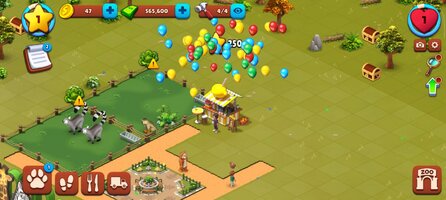
Welcome to the world of Zoo Island: Wild Family Park, a thrilling zoo simulation game, where you can design, build, and manage your own animal kingdom. Step into the wild and experience the joy of animal care, breeding cute animals, and running a bustling zoo park. If you love animal games
 and animal simulator games, where you can create your ideal zoo world, and manage an exciting zoo park, this game is for you!
Relaxing Fun, Made for Teens & Adults

Step into a cute and cozy world created with older players in mind
 . Wholesome, stress-free, and perfect for winding down after a long day. The animals may be adorable, but this game is crafted for teens and adults, not for small kids
 .
.Game Features

Care for Amazing Animals

Fill your zoo with a wide variety of animals, from small cute animals
 to majestic wild animals
  . Feed, care for, and interact with your cute animals to keep them happy and healthy. Every animal in your zoo feels like part of your family.
Build Your Ultimate Zoo

Start with a blank canvas and build your dream zoo park. Customize every corner with habitats, facilities, and decorations to make your animal zoo truly unique. From lush landscapes
 to cozy corners, your creativity will bring your animal kingdom to life!
Breed and Raise Animals

Yes! You will breed your favorite animals
 , like in no other zoo game. Build and live the excitement of animal breeding and enjoy watching them grow.
  From small steps to full-grown wild animals, your dedication to their care will make your zoo thrive.
View Animals in Stunning 3D

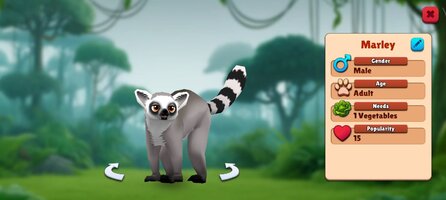
Immerse yourself in your zoo simulation with detailed 3D views of animals and their habitats. Watch them play, eat, and interact in their natural surroundings, bringing your animal kingdom to life.

Design and Decorate Your Zoo
Unleash your creativity! Add unique decorations, items, and special features to customize your zoo park, making it a place where visitors can enjoy unforgettable moments.
Connect with Friends

Visit friends’ zoos, share tips, and collaborate to improve your zoo management skills. Compete or work together to make your animal kingdom the best in the world!

Exciting Events and Rewards

Participate in special events to earn exclusive rewards
, rare animals, and unique decorations. Complete challenges to enhance your zoo simulation experience and grow your zoo park. 
Complete Quests and Achievements

Take on quests and challenges to unlock new animals, habitats, and features. Achievements will help you expand and elevate your zoo management experience.

Play Offline, Anytime, Anywhere

No internet? No problem! Enjoy this offline zoo game and manage your zoo world on the go.

Why Play Zoo Island: Wild Family Park?

Perfect for players of all ages

 who love animal games, animal care, and zoo simulation.
 A captivating mix of zoo management, animal breeding, animal care, and creative building.
Beautiful 3D graphics bring your zoo world to life
with realistic animations of cute animals. 
Engaging gameplay filled with fun events and endless customization options.

Whether you’re an animal lover
 , a creative builder , or someone who dreams of running a thriving animal kingdom, Zoo Island: Wild Family Park offers a truly unique and fun experience. Dive into this exciting zoo simulator and let your imagination soar!
 Download Zoo Island: Wild Family Park now and start building your ultimate zoo today!
*MOD Features*
No in-app purchases required
Free Download:
______________________________________
If credits are unknown or incorrect and you are the modder you are free to message @G-Bo and the credits will be corrected asap!
What you need to know about Shared-MODs
*How to install (click the spoilers to read)*
Signed APKs do work on all Android devices (rooted + non-rooted).
Signed APKs are in the most cases the only provided files by the mod publisher as they work for everyone.
1.) Remove the original game/app.
2.) Download the MOD APK.
3.) Install the downloaded MOD APK.
4.) Enjoy.
Regarding login methods, please note that logging in with Google will not be possible when using signed MODs. Facebook login (if available) is possible, but it requires you to remove the Facebook application from your device. Other game-specific login methods (if available), such as email, transfer code or guest login usually work fine.
Notes:
- If you used our MOD APK before and just want to update, you can install the new MOD APK on top of the old without removing the game/app first.
- In-App purchases are not possible on signed APKs as they require Google services similar to the Google login process.
Signed APKs are in the most cases the only provided files by the mod publisher as they work for everyone.
1.) Remove the original game/app.
2.) Download the MOD APK.
3.) Install the downloaded MOD APK.
4.) Enjoy.
Regarding login methods, please note that logging in with Google will not be possible when using signed MODs. Facebook login (if available) is possible, but it requires you to remove the Facebook application from your device. Other game-specific login methods (if available), such as email, transfer code or guest login usually work fine.
Notes:
- If you used our MOD APK before and just want to update, you can install the new MOD APK on top of the old without removing the game/app first.
- In-App purchases are not possible on signed APKs as they require Google services similar to the Google login process.
Unsigned APKs do only work on rooted and patched devices/environments.
These are not always provided by the mod publisher as they do only work under certain circumstances.
1.) Your device must be rooted.
2.) Your device must be patched to ignore app signatures. This can be done with the help of tools such as Luckypatcher or Xposed.
Once you fill that requirements the process is the same as with signed APKs with the difference that you can overwrite the original game/app with the MOD APK without removing it first.
1.) Download the unsigned MOD APK.
2.) Install the unsigned MOD APK.
3.) Enjoy.
Note:
For the case the unsigned APK does fail to install: Your device patch is not done correctly!
Login methods and In-App purchases on unsigned MODs function the same as in the original game. Logging in with Google works without issues. Keeping the Facebook application installed is also no problem.
You are rooted and want to know how to patch your device? Please check this for more information:
[Videotutorial] How To Login With Google+ Or Facebook App On Modded Games
These are not always provided by the mod publisher as they do only work under certain circumstances.
1.) Your device must be rooted.
2.) Your device must be patched to ignore app signatures. This can be done with the help of tools such as Luckypatcher or Xposed.
Once you fill that requirements the process is the same as with signed APKs with the difference that you can overwrite the original game/app with the MOD APK without removing it first.
1.) Download the unsigned MOD APK.
2.) Install the unsigned MOD APK.
3.) Enjoy.
Note:
For the case the unsigned APK does fail to install: Your device patch is not done correctly!
Login methods and In-App purchases on unsigned MODs function the same as in the original game. Logging in with Google works without issues. Keeping the Facebook application installed is also no problem.
You are rooted and want to know how to patch your device? Please check this for more information:
[Videotutorial] How To Login With Google+ Or Facebook App On Modded Games
OBB files are not required by every game/app. If necessary, the mod publisher will usually provide them and tell you that they are needed.
1.) Download the OBB file/files.
2.) Download the MOD APK.
3.) Move the OBB files with the help of a filemanager to Android/obb/<packagecode> on your device.
4.) Install the downloaded MOD APK.
5.) Enjoy.
The OBB files are either provided as ".obb" files or as ".zip" files. ZIP files do require to be extracted first.
Still facing issues? Please check here for more details:
How to install OBB files [as detailed as possible]
1.) Download the OBB file/files.
2.) Download the MOD APK.
3.) Move the OBB files with the help of a filemanager to Android/obb/<packagecode> on your device.
4.) Install the downloaded MOD APK.
5.) Enjoy.
The OBB files are either provided as ".obb" files or as ".zip" files. ZIP files do require to be extracted first.
Still facing issues? Please check here for more details:
How to install OBB files [as detailed as possible]
Tutorials:
How to sign up and download on Platinmods.com
List of useful tutorials about how to use this website and its content