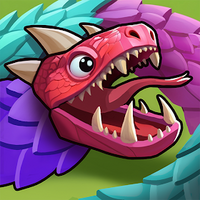
Playstore Link:

Game Name: Snake Go Escape
Game Version: 0.0.6
Needs OBB: No
Needs Root: No
 Don't Let Them Knot! Welcome to Snake Go Escape
Imagine a cluster of vibrant, colorful snakes trapped within a cramped maze grid—overlapping, tangled, and coiled tail-to-head.
You are the "Snake Master" destined to guide them back to freedom. This isn't just a game; it’s a fingertip ballet of space, sequence, and logic.
 Silky Puzzles: The Art of the Slide
In Snake Go Escape, your mission is deceptively simple yet intensely challenging: slide every snake out of the exit in the perfect order.
Timing is Everything: With snakes of all different lengths, who moves first and who follows? One tiny decision changes the entire board.
Zero Collisions: One wrong move and they’ll bump heads. You’ll need surgical precision to map out the only safe escape route.
Spatial Mastery: As levels escalate, the grids become more crowded, testing your ability to manage chaos within a confined space.
 Why You’ll Get Hooked
The Ultimate Cure for OCD: Watching a tangled mess of snakes glide smoothly off-screen under your command provides an indescribable sense of relief.
Brain Work, No Stress: We’ve ditched the stressful timers. Sip your coffee, take your time, and enjoy the pure pleasure of strategic deduction.
Artistic Minimalism: Vibrant color palettes meet fluid animations. Every swipe is a feast for the eyes.
A Mental Recharge Anywhere: Whether you're on your commute or taking a quick break, the bite-sized levels keep your brain sharp.
 Challenge Yourself, Break the Grid
There are no complex controls here—only the pursuit of perfect logic. From a few small hatchlings to massive pythons filling the screen, can you keep your cool and execute a "zero-error" evacuation?
The snakes are ready. The exit is open. Can you untangle this living puzzle?
 Download Snake Go Escape now and experience a silky, brain-burning, and deeply rewarding escape journey!
*MOD Features*
1. Free In App Purchase
Stay away from harmful malicious mods that fill your device with UNWANTED ADS! I always provide quality service with no such malicious tricks to earn money. We want you happy, that's our goal. You can be sure to download quality on platinmods.com.
*How to install (click the spoilers to read)*
Signed APKs do work on all Android devices (rooted + non-rooted).
Signed APKs are in the most cases the only provided files by the mod publisher as they work for everyone.
1.) Remove the original game/app.
2.) Download the MOD APK.
3.) Install the downloaded MOD APK.
4.) Enjoy.
Regarding login methods, please note that logging in with Google will not be possible when using signed MODs. Facebook login (if available) is possible, but it requires you to remove the Facebook application from your device. Other game-specific login methods (if available), such as email, transfer code or guest login usually work fine.
Notes:
- If you used our MOD APK before and just want to update, you can install the new MOD APK on top of the old without removing the game/app first.
- In-App purchases are not possible on signed APKs as they require Google services similar to the Google login process.
Signed APKs are in the most cases the only provided files by the mod publisher as they work for everyone.
1.) Remove the original game/app.
2.) Download the MOD APK.
3.) Install the downloaded MOD APK.
4.) Enjoy.
Regarding login methods, please note that logging in with Google will not be possible when using signed MODs. Facebook login (if available) is possible, but it requires you to remove the Facebook application from your device. Other game-specific login methods (if available), such as email, transfer code or guest login usually work fine.
Notes:
- If you used our MOD APK before and just want to update, you can install the new MOD APK on top of the old without removing the game/app first.
- In-App purchases are not possible on signed APKs as they require Google services similar to the Google login process.
Unsigned APKs do only work on rooted and patched devices/environments.
These are not always provided by the mod publisher as they do only work under certain circumstances.
1.) Your device must be rooted.
2.) Your device must be patched to ignore app signatures. This can be done with the help of tools such as Luckypatcher or Xposed.
Once you fill that requirements the process is the same as with signed APKs with the difference that you can overwrite the original game/app with the MOD APK without removing it first.
1.) Download the unsigned MOD APK.
2.) Install the unsigned MOD APK.
3.) Enjoy.
Note:
For the case the unsigned APK does fail to install: Your device patch is not done correctly!
Login methods and In-App purchases on unsigned MODs function the same as in the original game. Logging in with Google works without issues. Keeping the Facebook application installed is also no problem.
You are rooted and want to know how to patch your device? Please check this for more information:
[Videotutorial] How To Login With Google+ Or Facebook App On Modded Games
These are not always provided by the mod publisher as they do only work under certain circumstances.
1.) Your device must be rooted.
2.) Your device must be patched to ignore app signatures. This can be done with the help of tools such as Luckypatcher or Xposed.
Once you fill that requirements the process is the same as with signed APKs with the difference that you can overwrite the original game/app with the MOD APK without removing it first.
1.) Download the unsigned MOD APK.
2.) Install the unsigned MOD APK.
3.) Enjoy.
Note:
For the case the unsigned APK does fail to install: Your device patch is not done correctly!
Login methods and In-App purchases on unsigned MODs function the same as in the original game. Logging in with Google works without issues. Keeping the Facebook application installed is also no problem.
You are rooted and want to know how to patch your device? Please check this for more information:
[Videotutorial] How To Login With Google+ Or Facebook App On Modded Games
OBB files are not required by every game/app. If necessary, the mod publisher will usually provide them and tell you that they are needed.
1.) Download the OBB file/files.
2.) Download the MOD APK.
3.) Move the OBB files with the help of a filemanager to Android/obb/<packagecode> on your device.
4.) Install the downloaded MOD APK.
5.) Enjoy.
The OBB files are either provided as ".obb" files or as ".zip" files. ZIP files do require to be extracted first.
Still facing issues? Please check here for more details:
How to install OBB files [as detailed as possible]
1.) Download the OBB file/files.
2.) Download the MOD APK.
3.) Move the OBB files with the help of a filemanager to Android/obb/<packagecode> on your device.
4.) Install the downloaded MOD APK.
5.) Enjoy.
The OBB files are either provided as ".obb" files or as ".zip" files. ZIP files do require to be extracted first.
Still facing issues? Please check here for more details:
How to install OBB files [as detailed as possible]
Free Download:
! Hidden Content !
You must be registered and either click Like under this post or leave a comment before you can see the hidden links.
You may need to refresh the page after clicking Like. If you’re still having trouble revealing the hidden links, please
read this.
Did you know? VIP Members can see all links instantly, no unlocking required.
Interested? Get VIP here.
Interested? Get VIP here.
Tutorials:
How to sign up and download on Platinmods.com
List of useful tutorials about how to use this website and its content