Playstore Link:

CubeCraft: Merge & Battle - Apps on Google Play
Merge units, build a cube army, defend your village in strategic merge battles!
Game Name: CubeCraft: Merge & Battle
Game Version: 0.0.1
Needs OBB: No
Needs Root: No
CubeCraft: Merge & Battle is a casual merge game where you step into the world of CubeCraft, where battles, strategy, and powerful merges await! Your mission? Defend the Noob village by merging mobs into unstoppable monsters and crushing invading enemies!
How to Play CubeCraft: Merge & Battle
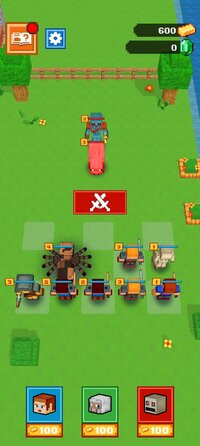
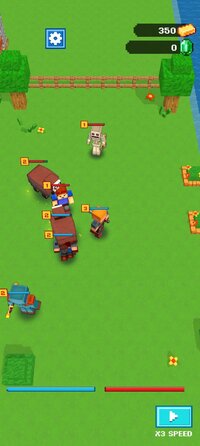
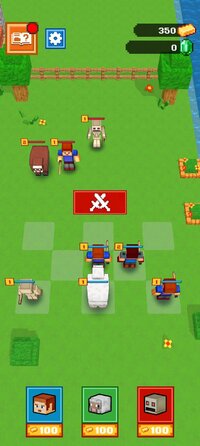
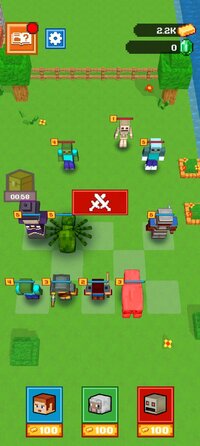
Step into a vibrant pixelated world where your mission is clear: defend the Noob village from relentless waves of invading enemies. To survive, you’ll need to merge characters pairing identical warriors, animals, and skeletons—to create stronger, tougher fighters. Each round gives you only a limited number of moves to merge and plan your defenses before the battle begins, so every decision matters.
Types of Fighters:
 Warrior - Brave and bold frontline defenders.
 Animal - Quick and nimble fighters with surprising strength.
 Skeleton - Fearless undead who can take a serious beating.
Win battles to earn reward money, then use it to unlock new fighters by choosing from three random options at the bottom of the screen. Merge strategically and position your units wisely—placement is just as important as power. As you advance, enemies will become faster, tougher, and far more relentless, so you’ll need to stay sharp and keep upgrading your army to survive.
Game Tips
Placement matters. Line up your fighters smartly to maximize their strength and defense during battle.
Keep evolving. Each wave of enemies grows stronger—merging and upgrading is essential to keep pace.
Plan ahead. With only a few moves before each fight, every merge and placement counts toward your survival.
Think fast, merge smart, and fight with everything you’ve got to protect your village at all costs!
How to Play CubeCraft: Merge & Battle
Step into a vibrant pixelated world where your mission is clear: defend the Noob village from relentless waves of invading enemies. To survive, you’ll need to merge characters pairing identical warriors, animals, and skeletons—to create stronger, tougher fighters. Each round gives you only a limited number of moves to merge and plan your defenses before the battle begins, so every decision matters.
Types of Fighters:
Warrior - Brave and bold frontline defenders. Animal - Quick and nimble fighters with surprising strength. Skeleton - Fearless undead who can take a serious beating.Win battles to earn reward money, then use it to unlock new fighters by choosing from three random options at the bottom of the screen. Merge strategically and position your units wisely—placement is just as important as power. As you advance, enemies will become faster, tougher, and far more relentless, so you’ll need to stay sharp and keep upgrading your army to survive.
Game Tips
Placement matters. Line up your fighters smartly to maximize their strength and defense during battle.
Keep evolving. Each wave of enemies grows stronger—merging and upgrading is essential to keep pace.
Plan ahead. With only a few moves before each fight, every merge and placement counts toward your survival.
Think fast, merge smart, and fight with everything you’ve got to protect your village at all costs!
*MOD Features*
Currency usage remains unchanged
Free Download:
______________________________________
If credits are unknown or incorrect and you are the modder you are free to message @G-Bo and the credits will be corrected asap!
What you need to know about Shared-MODs
*How to install (click the spoilers to read)*
Signed APKs do work on all Android devices (rooted + non-rooted).
Signed APKs are in the most cases the only provided files by the mod publisher as they work for everyone.
1.) Remove the original game/app.
2.) Download the MOD APK.
3.) Install the downloaded MOD APK.
4.) Enjoy.
Regarding login methods, please note that logging in with Google will not be possible when using signed MODs. Facebook login (if available) is possible, but it requires you to remove the Facebook application from your device. Other game-specific login methods (if available), such as email, transfer code or guest login usually work fine.
Notes:
- If you used our MOD APK before and just want to update, you can install the new MOD APK on top of the old without removing the game/app first.
- In-App purchases are not possible on signed APKs as they require Google services similar to the Google login process.
Signed APKs are in the most cases the only provided files by the mod publisher as they work for everyone.
1.) Remove the original game/app.
2.) Download the MOD APK.
3.) Install the downloaded MOD APK.
4.) Enjoy.
Regarding login methods, please note that logging in with Google will not be possible when using signed MODs. Facebook login (if available) is possible, but it requires you to remove the Facebook application from your device. Other game-specific login methods (if available), such as email, transfer code or guest login usually work fine.
Notes:
- If you used our MOD APK before and just want to update, you can install the new MOD APK on top of the old without removing the game/app first.
- In-App purchases are not possible on signed APKs as they require Google services similar to the Google login process.
Unsigned APKs do only work on rooted and patched devices/environments.
These are not always provided by the mod publisher as they do only work under certain circumstances.
1.) Your device must be rooted.
2.) Your device must be patched to ignore app signatures. This can be done with the help of tools such as Luckypatcher or Xposed.
Once you fill that requirements the process is the same as with signed APKs with the difference that you can overwrite the original game/app with the MOD APK without removing it first.
1.) Download the unsigned MOD APK.
2.) Install the unsigned MOD APK.
3.) Enjoy.
Note:
For the case the unsigned APK does fail to install: Your device patch is not done correctly!
Login methods and In-App purchases on unsigned MODs function the same as in the original game. Logging in with Google works without issues. Keeping the Facebook application installed is also no problem.
You are rooted and want to know how to patch your device? Please check this for more information:
[Videotutorial] How To Login With Google+ Or Facebook App On Modded Games
These are not always provided by the mod publisher as they do only work under certain circumstances.
1.) Your device must be rooted.
2.) Your device must be patched to ignore app signatures. This can be done with the help of tools such as Luckypatcher or Xposed.
Once you fill that requirements the process is the same as with signed APKs with the difference that you can overwrite the original game/app with the MOD APK without removing it first.
1.) Download the unsigned MOD APK.
2.) Install the unsigned MOD APK.
3.) Enjoy.
Note:
For the case the unsigned APK does fail to install: Your device patch is not done correctly!
Login methods and In-App purchases on unsigned MODs function the same as in the original game. Logging in with Google works without issues. Keeping the Facebook application installed is also no problem.
You are rooted and want to know how to patch your device? Please check this for more information:
[Videotutorial] How To Login With Google+ Or Facebook App On Modded Games
OBB files are not required by every game/app. If necessary, the mod publisher will usually provide them and tell you that they are needed.
1.) Download the OBB file/files.
2.) Download the MOD APK.
3.) Move the OBB files with the help of a filemanager to Android/obb/<packagecode> on your device.
4.) Install the downloaded MOD APK.
5.) Enjoy.
The OBB files are either provided as ".obb" files or as ".zip" files. ZIP files do require to be extracted first.
Still facing issues? Please check here for more details:
How to install OBB files [as detailed as possible]
1.) Download the OBB file/files.
2.) Download the MOD APK.
3.) Move the OBB files with the help of a filemanager to Android/obb/<packagecode> on your device.
4.) Install the downloaded MOD APK.
5.) Enjoy.
The OBB files are either provided as ".obb" files or as ".zip" files. ZIP files do require to be extracted first.
Still facing issues? Please check here for more details:
How to install OBB files [as detailed as possible]
Tutorials:
How to sign up and download on Platinmods.com
List of useful tutorials about how to use this website and its content