DAMNA8990
Platinian
Playstore Link:

Delta Force: 2nd Anniversary - Apps on Google Play
Competitive Operator-Based Extraction Shooter
Game Name: Delta Force: 2nd Anniversary
Game Version: v1.202.37117.5601
Needs OBB: No
Needs Root: No
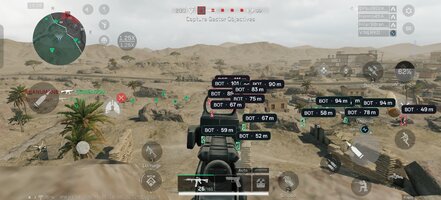
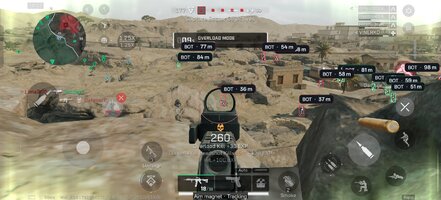
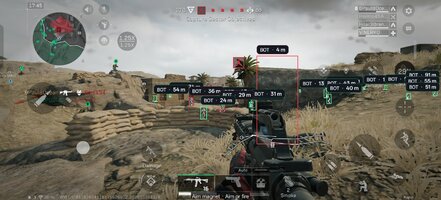
*MOD Preview*
*MOD Features*
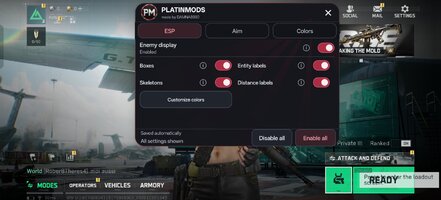
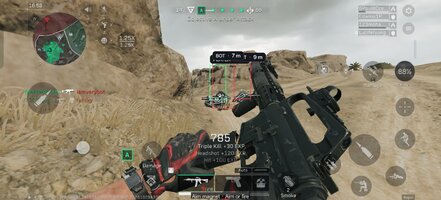
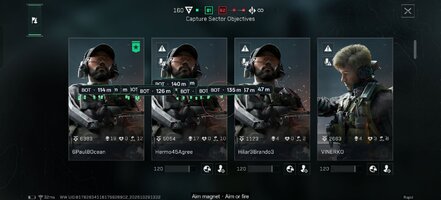
- ESP: enemy boxes, animated skeletons, distance in meters, and PLAYER, BOT, CROCODILE, ANIMAL, or ENTITY labels. Boxes, skeletons, labels, and distances can be toggled independently.
- Filtering: excludes your character, teammates, and characters identified as dead. Overlapping labels are drawn with the nearest enemy’s label on top.
- Visibility colors: red for exposed enemies and green for hidden enemies by default. This checks visibility from the camera; it does not guarantee that a bullet can hit.
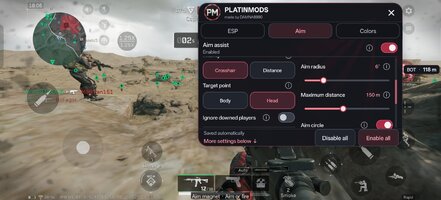
- Aim assist: attracts the crosshair toward a visible enemy. Activation can be set to aiming only, firing only, or either aiming or firing. Shooting remains manual.
- Aim point: choose Body or Head, with automatic fallback to the other point when only that point is visible.
- Target priority: select the eligible enemy closest to the crosshair or nearest to your character.
- Aim settings: strength from 1–100%, aim radius from 2–20°, maximum targeting distance from 25–300 meters, an optional aim circle, and an option to ignore downed players.
- Target-switch delay: 0–500 ms, adjustable in 25 ms steps, after the tracked target dies, disappears, or becomes excluded. Setting it to 0 disables the waiting period.
- Movement prediction: optionally aims ahead of moving targets using their velocity and recognized projectile parameters. Experimental: it is not exhaustively calibrated for every weapon and does not fully model gravity, network latency, or inherited shooter velocity.
- Color customization: visibility-based box colors, a single fixed color, or an animated RGB cycle with a 1–12 second period. Separate colors for skeletons, label text, label backgrounds, and the aim circle. Includes a color square, hue bar, RGB/hex input, presets, and color reset.
- PM menu: ESP / Aim / Colors tabs, a compact two-column layout when space allows, scrolling, ⓘ explanations, disabled controls when their master feature is off, and saved settings.
- Retractable floating button: draggable PM button that automatically collapses into a small edge handle after 4 seconds of inactivity, similar to Samsung’s screen recorder. Its position is saved.
Credit to: DAMNA8990
Free Download:
! Hidden Content !
You must be registered and either click Like under this post or leave a comment before you can see the hidden links.
You may need to refresh the page after clicking Like. If you’re still having trouble revealing the hidden links, please
read this.
Did you know? VIP Members can see all links instantly, no unlocking required.
Interested? Get VIP here.
Interested? Get VIP here.
______________________________________
If credits are unknown or incorrect and you are the modder you are free to message @G-Bo and the credits will be corrected asap!
What you need to know about Shared-MODs
*How to install (click the spoilers to read)*
Signed APKs do work on all Android devices (rooted + non-rooted).
Signed APKs are in the most cases the only provided files by the mod publisher as they work for everyone.
1.) Remove the original game/app.
2.) Download the MOD APK.
3.) Install the downloaded MOD APK.
4.) Enjoy.
Regarding login methods, please note that logging in with Google will not be possible when using signed MODs. Facebook login (if available) is possible, but it requires you to remove the Facebook application from your device. Other game-specific login methods (if available), such as email, transfer code or guest login usually work fine.
Notes:
- If you used our MOD APK before and just want to update, you can install the new MOD APK on top of the old without removing the game/app first.
- In-App purchases are not possible on signed APKs as they require Google services similar to the Google login process.
Signed APKs are in the most cases the only provided files by the mod publisher as they work for everyone.
1.) Remove the original game/app.
2.) Download the MOD APK.
3.) Install the downloaded MOD APK.
4.) Enjoy.
Regarding login methods, please note that logging in with Google will not be possible when using signed MODs. Facebook login (if available) is possible, but it requires you to remove the Facebook application from your device. Other game-specific login methods (if available), such as email, transfer code or guest login usually work fine.
Notes:
- If you used our MOD APK before and just want to update, you can install the new MOD APK on top of the old without removing the game/app first.
- In-App purchases are not possible on signed APKs as they require Google services similar to the Google login process.
Unsigned APKs do only work on rooted and patched devices/environments.
These are not always provided by the mod publisher as they do only work under certain circumstances.
1.) Your device must be rooted.
2.) Your device must be patched to ignore app signatures. This can be done with the help of tools such as Luckypatcher or Xposed.
Once you fill that requirements the process is the same as with signed APKs with the difference that you can overwrite the original game/app with the MOD APK without removing it first.
1.) Download the unsigned MOD APK.
2.) Install the unsigned MOD APK.
3.) Enjoy.
Note:
For the case the unsigned APK does fail to install: Your device patch is not done correctly!
Login methods and In-App purchases on unsigned MODs function the same as in the original game. Logging in with Google works without issues. Keeping the Facebook application installed is also no problem.
You are rooted and want to know how to patch your device? Please check this for more information:
[Videotutorial] How To Login With Google+ Or Facebook App On Modded Games
These are not always provided by the mod publisher as they do only work under certain circumstances.
1.) Your device must be rooted.
2.) Your device must be patched to ignore app signatures. This can be done with the help of tools such as Luckypatcher or Xposed.
Once you fill that requirements the process is the same as with signed APKs with the difference that you can overwrite the original game/app with the MOD APK without removing it first.
1.) Download the unsigned MOD APK.
2.) Install the unsigned MOD APK.
3.) Enjoy.
Note:
For the case the unsigned APK does fail to install: Your device patch is not done correctly!
Login methods and In-App purchases on unsigned MODs function the same as in the original game. Logging in with Google works without issues. Keeping the Facebook application installed is also no problem.
You are rooted and want to know how to patch your device? Please check this for more information:
[Videotutorial] How To Login With Google+ Or Facebook App On Modded Games
OBB files are not required by every game/app. If necessary, the mod publisher will usually provide them and tell you that they are needed.
1.) Download the OBB file/files.
2.) Download the MOD APK.
3.) Move the OBB files with the help of a filemanager to Android/obb/<packagecode> on your device.
4.) Install the downloaded MOD APK.
5.) Enjoy.
The OBB files are either provided as ".obb" files or as ".zip" files. ZIP files do require to be extracted first.
Still facing issues? Please check here for more details:
How to install OBB files [as detailed as possible]
1.) Download the OBB file/files.
2.) Download the MOD APK.
3.) Move the OBB files with the help of a filemanager to Android/obb/<packagecode> on your device.
4.) Install the downloaded MOD APK.
5.) Enjoy.
The OBB files are either provided as ".obb" files or as ".zip" files. ZIP files do require to be extracted first.
Still facing issues? Please check here for more details:
How to install OBB files [as detailed as possible]
Tutorials:
How to sign up and download on Platinmods.com
List of useful tutorials about how to use this website and its content
Last edited by a moderator:


 So many features I have to take a look twice. W explanation