AnshikaG
Just Crazy
Playstore Link:

Hypnospace Outlaw - Apps on Google Play
An alternate reality 1999 internet simulator
Game Name: Hypnospace Outlaw
Game Version: v1.0.68
Needs OBB: No
Needs Root: No
*NOTICE*: Play the beginning for free. A one-time in-app purchase unlocks the full game. No ads.
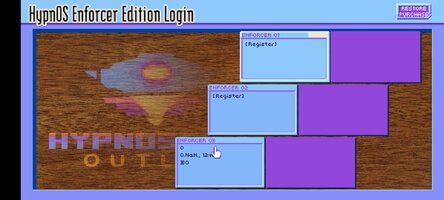
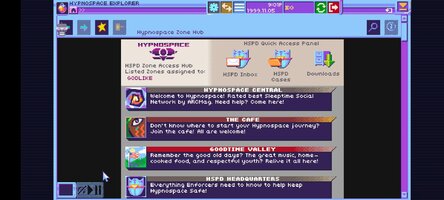
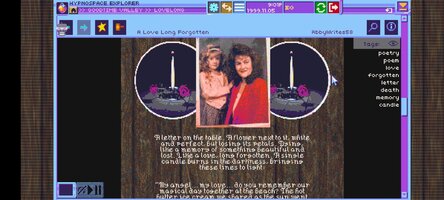
Hypnospace Outlaw is a '90s internet simulator in which you scour Hypnospace's wide variety of weird and wonderful websites to hunt down wrongdoers, while also keeping an eye on your inbox, avoiding viruses and adware, and downloading a plethora of apps that may or may not be useful.
As part of your job as a Hypnospace Enforcer, you'll be watching out for copyright infringement, internet bullying and more, with reports and rewards coming direct from the Hypnospace Patrol Department to your inbox. In your spare time, you can customize your HypnOS desktop however you see fit, with a variety of downloads, wallpapers, screensavers and helper bots to keep you company.
So slip on your Hypnospace Headband™, and keep these key directives in mind:
- Crawl through Cyberspace: Scour the darkest corners of the Web for scumbag users who violate Hypnospace law!
- Dangers and delights: Download groovy GIFS and MIDI files, but watch out for adware, toolbars and hackers!
- Treasure hunting: Do your job to earn HypnoCoins, or ignore your inbox and go hunting for hidden pages, downloads and secrets!
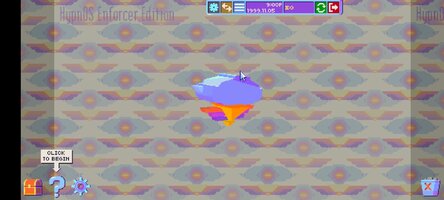
- Relive your childhood: Equip obnoxious screensavers and skins for your desktop, and wiggle your mouse pointer around to make pages load faster!
Optimized for mobile with full touch controls and revamped UI!
Hypnospace Outlaw is a '90s internet simulator in which you scour Hypnospace's wide variety of weird and wonderful websites to hunt down wrongdoers, while also keeping an eye on your inbox, avoiding viruses and adware, and downloading a plethora of apps that may or may not be useful.
As part of your job as a Hypnospace Enforcer, you'll be watching out for copyright infringement, internet bullying and more, with reports and rewards coming direct from the Hypnospace Patrol Department to your inbox. In your spare time, you can customize your HypnOS desktop however you see fit, with a variety of downloads, wallpapers, screensavers and helper bots to keep you company.
So slip on your Hypnospace Headband™, and keep these key directives in mind:
- Crawl through Cyberspace: Scour the darkest corners of the Web for scumbag users who violate Hypnospace law!
- Dangers and delights: Download groovy GIFS and MIDI files, but watch out for adware, toolbars and hackers!
- Treasure hunting: Do your job to earn HypnoCoins, or ignore your inbox and go hunting for hidden pages, downloads and secrets!
- Relive your childhood: Equip obnoxious screensavers and skins for your desktop, and wiggle your mouse pointer around to make pages load faster!
Optimized for mobile with full touch controls and revamped UI!
*MOD Features*
Full unlocked
Credit to: ?
Free Download:
! Hidden Content !
You must be registered and either click Like under this post or leave a comment before you can see the hidden links.
You may need to refresh the page after clicking Like. If you’re still having trouble revealing the hidden links, please
read this.
Did you know? VIP Members can see all links instantly, no unlocking required.
Interested? Get VIP here.
Interested? Get VIP here.
If credits are unknown or incorrect and you are the modder you are free to message @G-Bo and the credits will be corrected asap!
What you need to know about Shared-MODs
*How to install (click the spoilers to read)*
Signed APKs do work on all Android devices (rooted + non-rooted).
Signed APKs are in the most cases the only provided files by the mod publisher as they work for everyone.
1.) Remove the original game/app.
2.) Download the MOD APK.
3.) Install the downloaded MOD APK.
4.) Enjoy.
Regarding login methods, please note that logging in with Google will not be possible when using signed MODs. Facebook login (if available) is possible, but it requires you to remove the Facebook application from your device. Other game-specific login methods (if available), such as email, transfer code or guest login usually work fine.
Notes:
- If you used our MOD APK before and just want to update, you can install the new MOD APK on top of the old without removing the game/app first.
- In-App purchases are not possible on signed APKs as they require Google services similar to the Google login process.
Signed APKs are in the most cases the only provided files by the mod publisher as they work for everyone.
1.) Remove the original game/app.
2.) Download the MOD APK.
3.) Install the downloaded MOD APK.
4.) Enjoy.
Regarding login methods, please note that logging in with Google will not be possible when using signed MODs. Facebook login (if available) is possible, but it requires you to remove the Facebook application from your device. Other game-specific login methods (if available), such as email, transfer code or guest login usually work fine.
Notes:
- If you used our MOD APK before and just want to update, you can install the new MOD APK on top of the old without removing the game/app first.
- In-App purchases are not possible on signed APKs as they require Google services similar to the Google login process.
Unsigned APKs do only work on rooted and patched devices/environments.
These are not always provided by the mod publisher as they do only work under certain circumstances.
1.) Your device must be rooted.
2.) Your device must be patched to ignore app signatures. This can be done with the help of tools such as Luckypatcher or Xposed.
Once you fill that requirements the process is the same as with signed APKs with the difference that you can overwrite the original game/app with the MOD APK without removing it first.
1.) Download the unsigned MOD APK.
2.) Install the unsigned MOD APK.
3.) Enjoy.
Note:
For the case the unsigned APK does fail to install: Your device patch is not done correctly!
Login methods and In-App purchases on unsigned MODs function the same as in the original game. Logging in with Google works without issues. Keeping the Facebook application installed is also no problem.
You are rooted and want to know how to patch your device? Please check this for more information:
[Videotutorial] How To Login With Google+ Or Facebook App On Modded Games
These are not always provided by the mod publisher as they do only work under certain circumstances.
1.) Your device must be rooted.
2.) Your device must be patched to ignore app signatures. This can be done with the help of tools such as Luckypatcher or Xposed.
Once you fill that requirements the process is the same as with signed APKs with the difference that you can overwrite the original game/app with the MOD APK without removing it first.
1.) Download the unsigned MOD APK.
2.) Install the unsigned MOD APK.
3.) Enjoy.
Note:
For the case the unsigned APK does fail to install: Your device patch is not done correctly!
Login methods and In-App purchases on unsigned MODs function the same as in the original game. Logging in with Google works without issues. Keeping the Facebook application installed is also no problem.
You are rooted and want to know how to patch your device? Please check this for more information:
[Videotutorial] How To Login With Google+ Or Facebook App On Modded Games
OBB files are not required by every game/app. If necessary, the mod publisher will usually provide them and tell you that they are needed.
1.) Download the OBB file/files.
2.) Download the MOD APK.
3.) Move the OBB files with the help of a filemanager to Android/obb/<packagecode> on your device.
4.) Install the downloaded MOD APK.
5.) Enjoy.
The OBB files are either provided as ".obb" files or as ".zip" files. ZIP files do require to be extracted first.
Still facing issues? Please check here for more details:
How to install OBB files [as detailed as possible]
1.) Download the OBB file/files.
2.) Download the MOD APK.
3.) Move the OBB files with the help of a filemanager to Android/obb/<packagecode> on your device.
4.) Install the downloaded MOD APK.
5.) Enjoy.
The OBB files are either provided as ".obb" files or as ".zip" files. ZIP files do require to be extracted first.
Still facing issues? Please check here for more details:
How to install OBB files [as detailed as possible]
Tutorials:
How to sign up and download on Platinmods.com
List of useful tutorials about how to use this website and its content