Playstore Link:

Medieval: Offline TD Strategy - Apps on Google Play
Medieval tower defense strategy with trade, farming, war, and castle building.
Game Name: Medieval: Offline TD Strategy
Game Version: 1.1.0
Needs OBB: No
Needs Root: No
Unique mix of wave tower defense, war strategy, idle game, and kingdom management warrior game - all created by me as a single developer.
Discord: Join the Medieval: Defense & Conquest Discord Server!
You are a medieval knight, serving your king as a mercenary. Impressed by your victorious battles and leadership skills, the king offers you a chance of a lifetime - sail on a crusader ship to a new island and start a settlement there.
You will be in charge of both the settlement’s military and economy. Your goal is to build up the crusader settlement, profit from trade and farming, and then use the income to improve your army and defenses. Strong walls manned by archers and ballistas will help you withstand constant enemy attacks. To defend your settlement, you will need to train your army, upgrade equipment, and research new unit types to grow your empire.
Then, once your economy is up and running and your crusader army grows in size and power, it’s time to go on the offensive and start expanding your stronghold. Attack enemy outposts, conquer their walls, and turn them into a new source of income for your growing colony and warrior empire.
Welcome, future king! Your first task is to build up your small village on the coast of an unexplored island. Starting with just a simple wooden fence and a modest fort, you need to grow your defences and train your crusader soldiers to be able to defend yourself against endless waves of enemies.
• Build up defences and strenghten your stronghold's walls
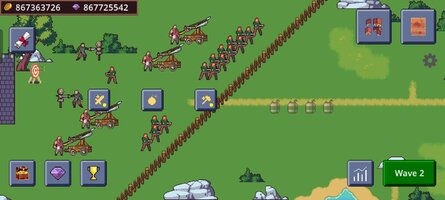
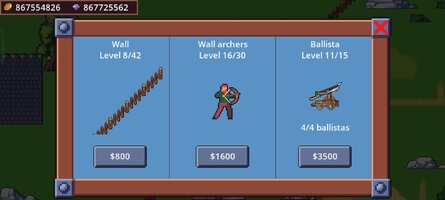
• Place skilled archers and terrifying ballistas on your walls
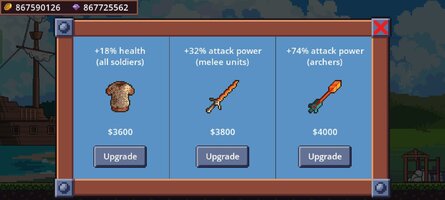
• Use your blacksmith to get better swords and armors
• Craft more powerful bows and sharper arrows
• Clash for survival against hordes of powerful enemies
• Defeat epic bosses who will try to destroy your village
As your power grows, you will soon have the opportunity to take the initiative from your enemies and go on the offensive. Start conquering small neighbouring outposts - take them, build up their economy, and start earning passive idle income even when offline!
Together with trading ships, skilled merchants, farmers, and profits from repelled enemies, you will soon be able to build up even better defences, expand your network of money-making outposts, earn more money farming valuable crops, and conquer and unite the whole island under your just rule.
• Boss levels with giant enemies
• 40+ enemy outposts to conquer and develop your economy
• Beautiful pixel art game map and characters
• Idle income and trade progress works even when you are offline
• Your own village, trading ship, merchants, blacksmith, farm
• Upgradable soldiers, knights, archers, and fast horsemen at your service
• Walls which can grow from simple wooden fence to a massive stone castle wall
• Archers who can be placed on your walls to improve passive defence
• Ballistas to boost your defensive efforts
• Merchants and trading ships as source of income
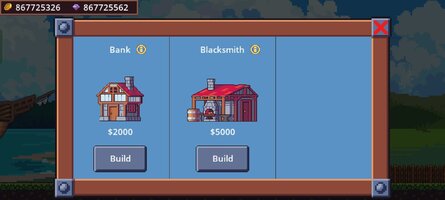
• Bank which automates collecting gold from your outpost colonies
• Skilled blacksmith to improve your gear, armor, swords, and sharper arrows
• ...and more fun stuff being added with each future update!

New content is constantly being added to Medieval: Offline TD Strategy to provide more depth and a smoother experience - please send me your feedback and suggestions so that I can improve the game even further and support its future development and new projects. Thank you for playing!
Discord: Join the Medieval: Defense & Conquest Discord Server!
You are a medieval knight, serving your king as a mercenary. Impressed by your victorious battles and leadership skills, the king offers you a chance of a lifetime - sail on a crusader ship to a new island and start a settlement there.
You will be in charge of both the settlement’s military and economy. Your goal is to build up the crusader settlement, profit from trade and farming, and then use the income to improve your army and defenses. Strong walls manned by archers and ballistas will help you withstand constant enemy attacks. To defend your settlement, you will need to train your army, upgrade equipment, and research new unit types to grow your empire.
Then, once your economy is up and running and your crusader army grows in size and power, it’s time to go on the offensive and start expanding your stronghold. Attack enemy outposts, conquer their walls, and turn them into a new source of income for your growing colony and warrior empire.
Welcome, future king! Your first task is to build up your small village on the coast of an unexplored island. Starting with just a simple wooden fence and a modest fort, you need to grow your defences and train your crusader soldiers to be able to defend yourself against endless waves of enemies.
To be able to withstand constant enemy attacks, you will have to:
• Train your soldiers from simple peasants to experienced warriors• Build up defences and strenghten your stronghold's walls
• Place skilled archers and terrifying ballistas on your walls
• Use your blacksmith to get better swords and armors
• Craft more powerful bows and sharper arrows
• Clash for survival against hordes of powerful enemies
• Defeat epic bosses who will try to destroy your village
As your power grows, you will soon have the opportunity to take the initiative from your enemies and go on the offensive.
Start conquering small neighbouring outposts - take them, build up their economy, and start earning passive idle income even when offline! Together with trading ships, skilled merchants, farmers, and profits from repelled enemies, you will soon be able to build up even better defences, expand your network of money-making outposts, earn more money farming valuable crops, and conquer and unite the whole island under your just rule.
Medieval: Offline TD Strategy features:
• 70+ enemy unit types with unique stats and skills• Boss levels with giant enemies
• 40+ enemy outposts to conquer and develop your economy
• Beautiful pixel art game map and characters
• Idle income and trade progress works even when you are offline
• Your own village, trading ship, merchants, blacksmith, farm
• Upgradable soldiers, knights, archers, and fast horsemen at your service
• Walls which can grow from simple wooden fence to a massive stone castle wall
• Archers who can be placed on your walls to improve passive defence
• Ballistas to boost your defensive efforts
• Merchants and trading ships as source of income
• Bank which automates collecting gold from your outpost colonies
• Skilled blacksmith to improve your gear, armor, swords, and sharper arrows
• ...and more fun stuff being added with each future update!
About me
My name is Vojtech, I'm a solo game developer based in the Czech Republic and I created this game without any external funding - big thanks to everyone who provided valuable feedback and support!New content is constantly being added to Medieval: Offline TD Strategy to provide more depth and a smoother experience - please send me your feedback and suggestions so that I can improve the game even further and support its future development and new projects. Thank you for playing!
*MOD Features*
Unlimited Money
Free Download:
! Hidden Content !
You must be registered and either click Like under this post or leave a comment before you can see the hidden links.
You may need to refresh the page after clicking Like. If you’re still having trouble revealing the hidden links, please
read this.
Did you know? VIP Members can see all links instantly, no unlocking required.
Interested? Get VIP here.
Interested? Get VIP here.
______________________________________
If credits are unknown or incorrect and you are the modder you are free to message @G-Bo and the credits will be corrected asap!
What you need to know about Shared-MODs
*How to install (click the spoilers to read)*
Signed APKs do work on all Android devices (rooted + non-rooted).
Signed APKs are in the most cases the only provided files by the mod publisher as they work for everyone.
1.) Remove the original game/app.
2.) Download the MOD APK.
3.) Install the downloaded MOD APK.
4.) Enjoy.
Regarding login methods, please note that logging in with Google will not be possible when using signed MODs. Facebook login (if available) is possible, but it requires you to remove the Facebook application from your device. Other game-specific login methods (if available), such as email, transfer code or guest login usually work fine.
Notes:
- If you used our MOD APK before and just want to update, you can install the new MOD APK on top of the old without removing the game/app first.
- In-App purchases are not possible on signed APKs as they require Google services similar to the Google login process.
Signed APKs are in the most cases the only provided files by the mod publisher as they work for everyone.
1.) Remove the original game/app.
2.) Download the MOD APK.
3.) Install the downloaded MOD APK.
4.) Enjoy.
Regarding login methods, please note that logging in with Google will not be possible when using signed MODs. Facebook login (if available) is possible, but it requires you to remove the Facebook application from your device. Other game-specific login methods (if available), such as email, transfer code or guest login usually work fine.
Notes:
- If you used our MOD APK before and just want to update, you can install the new MOD APK on top of the old without removing the game/app first.
- In-App purchases are not possible on signed APKs as they require Google services similar to the Google login process.
Unsigned APKs do only work on rooted and patched devices/environments.
These are not always provided by the mod publisher as they do only work under certain circumstances.
1.) Your device must be rooted.
2.) Your device must be patched to ignore app signatures. This can be done with the help of tools such as Luckypatcher or Xposed.
Once you fill that requirements the process is the same as with signed APKs with the difference that you can overwrite the original game/app with the MOD APK without removing it first.
1.) Download the unsigned MOD APK.
2.) Install the unsigned MOD APK.
3.) Enjoy.
Note:
For the case the unsigned APK does fail to install: Your device patch is not done correctly!
Login methods and In-App purchases on unsigned MODs function the same as in the original game. Logging in with Google works without issues. Keeping the Facebook application installed is also no problem.
You are rooted and want to know how to patch your device? Please check this for more information:
[Videotutorial] How To Login With Google+ Or Facebook App On Modded Games
These are not always provided by the mod publisher as they do only work under certain circumstances.
1.) Your device must be rooted.
2.) Your device must be patched to ignore app signatures. This can be done with the help of tools such as Luckypatcher or Xposed.
Once you fill that requirements the process is the same as with signed APKs with the difference that you can overwrite the original game/app with the MOD APK without removing it first.
1.) Download the unsigned MOD APK.
2.) Install the unsigned MOD APK.
3.) Enjoy.
Note:
For the case the unsigned APK does fail to install: Your device patch is not done correctly!
Login methods and In-App purchases on unsigned MODs function the same as in the original game. Logging in with Google works without issues. Keeping the Facebook application installed is also no problem.
You are rooted and want to know how to patch your device? Please check this for more information:
[Videotutorial] How To Login With Google+ Or Facebook App On Modded Games
OBB files are not required by every game/app. If necessary, the mod publisher will usually provide them and tell you that they are needed.
1.) Download the OBB file/files.
2.) Download the MOD APK.
3.) Move the OBB files with the help of a filemanager to Android/obb/<packagecode> on your device.
4.) Install the downloaded MOD APK.
5.) Enjoy.
The OBB files are either provided as ".obb" files or as ".zip" files. ZIP files do require to be extracted first.
Still facing issues? Please check here for more details:
How to install OBB files [as detailed as possible]
1.) Download the OBB file/files.
2.) Download the MOD APK.
3.) Move the OBB files with the help of a filemanager to Android/obb/<packagecode> on your device.
4.) Install the downloaded MOD APK.
5.) Enjoy.
The OBB files are either provided as ".obb" files or as ".zip" files. ZIP files do require to be extracted first.
Still facing issues? Please check here for more details:
How to install OBB files [as detailed as possible]
Tutorials:
How to sign up and download on Platinmods.com
List of useful tutorials about how to use this website and its content