

Playstore Link:

Game Name: Stormed MOBA
Game Version: 9.71
Needs OBB: No
Needs Root: No
MOBA meets deckbuilding.
A short, super intense MOBA with deep elements of strategy.
Intense, quick, skill-based 5-10 min battles await you in 1v1, 2v2 and 3v3.
Stormed reinvents the MOBA blueprint to take the genre to the next level. Short but hyper intense matches, thrilling 1v1 - 3v3 PVP fights but also coming with a more tactical PVE mode. On top of that, our innovative deckbuilder feature for endless strategic tinkering of your perfect minion composition will deeply touch your MOBA heart.
In our standard game mode you need to destroy the enemy's base to win. We are working on additional, never-seen before game modes which no game offers on the market yet.
KEY FEATURES:
• Short, 5-10 minute matches
• 1v1, 2v2 and 3v3 team modes
• Intense tower-to-tower lane pushing
• PVE mode for more casual, tactical gameplay
• PVP mode for intense, competitive team fights
• Deck builder to build your best minion composition.
• Simple, intuitive controls, optimized for mobile touch screens.
• 36 heroes, 36 minion types and countless neutral creep monsters each with their unique background story and abilities*
• UGC elements: Participate in the game design with the devs, co-create gameplay ideas and content and have a strong impact on the further development of the game.
• Social features like leaderboards, user profiles, guilds, chats, emojis to show off, team raids and more*
• Dozens of perks, items and power-ups which spice up the game.
• 3 different game worlds to play through the story.*
• Cool skins to make your hero look more epic.*
• Fast growing community on Discord
• Real-time multiplayer.
Intense, quick, skill-based 5-10 min battles await you in 1v1, 2v2 and 3v3.
Stormed reinvents the MOBA blueprint to take the genre to the next level. Short but hyper intense matches, thrilling 1v1 - 3v3 PVP fights but also coming with a more tactical PVE mode. On top of that, our innovative deckbuilder feature for endless strategic tinkering of your perfect minion composition will deeply touch your MOBA heart.
In our standard game mode you need to destroy the enemy's base to win. We are working on additional, never-seen before game modes which no game offers on the market yet.
KEY FEATURES:
• Short, 5-10 minute matches
• 1v1, 2v2 and 3v3 team modes
• Intense tower-to-tower lane pushing
• PVE mode for more casual, tactical gameplay
• PVP mode for intense, competitive team fights
• Deck builder to build your best minion composition.
• Simple, intuitive controls, optimized for mobile touch screens.
• 36 heroes, 36 minion types and countless neutral creep monsters each with their unique background story and abilities*
• UGC elements: Participate in the game design with the devs, co-create gameplay ideas and content and have a strong impact on the further development of the game.
• Social features like leaderboards, user profiles, guilds, chats, emojis to show off, team raids and more*
• Dozens of perks, items and power-ups which spice up the game.
• 3 different game worlds to play through the story.*
• Cool skins to make your hero look more epic.*
• Fast growing community on Discord
• Real-time multiplayer.
*MOD Preview*
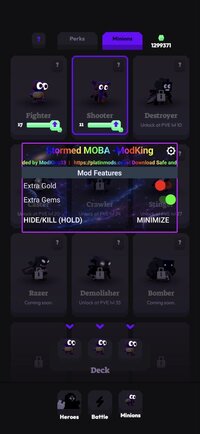
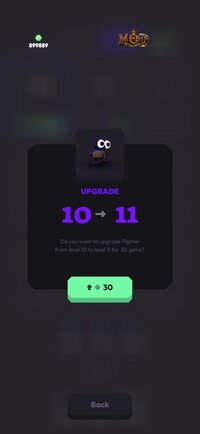
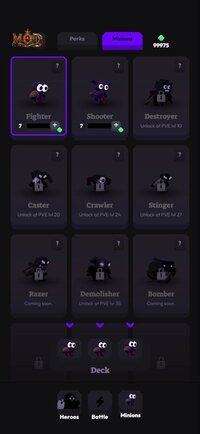
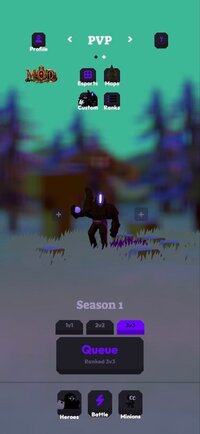
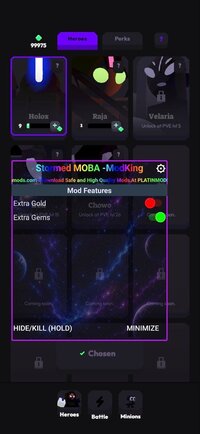
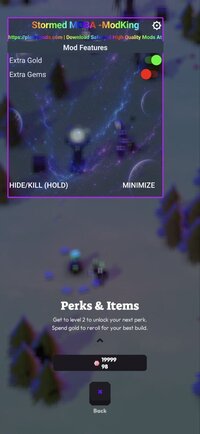
*MOD Features*
1. Extra Gold
2. Extra Gems
Notes: Only Turn Unlimited Gold when you join a match be it in PVE or PVP then play a bit until you pick up some gold then when you go to pick up a skill look to see if the value changed, after it changed disable the Extra Gold toggle.Every new match you start you have to do this since the gold always starts at 0.
For the Extra Gems turn it on in the main screen of the game then go to Heroes and tap to update hero, check the value until it changes then disable it.
Why Disable it? So the values don't become negative and bug the game, specially the Gems that never resets.
Enjoy! - Let me Know if you liked the mod and would like to see more features in the future.
For the Extra Gems turn it on in the main screen of the game then go to Heroes and tap to update hero, check the value until it changes then disable it.
Why Disable it? So the values don't become negative and bug the game, specially the Gems that never resets.
Enjoy! - Let me Know if you liked the mod and would like to see more features in the future.
*How to install (click the spoilers to read)*
Signed APKs do work on all Android devices (rooted + non-rooted).
Signed APKs are in the most cases the only provided files by the mod publisher as they work for everyone.
1.) Remove the original game/app.
2.) Download the MOD APK.
3.) Install the downloaded MOD APK.
4.) Enjoy.
Regarding login methods, please note that logging in with Google will not be possible when using signed MODs. Facebook login (if available) is possible, but it requires you to remove the Facebook application from your device. Other game-specific login methods (if available), such as email, transfer code or guest login usually work fine.
Notes:
- If you used our MOD APK before and just want to update, you can install the new MOD APK on top of the old without removing the game/app first.
- In-App purchases are not possible on signed APKs as they require Google services similar to the Google login process.
Signed APKs are in the most cases the only provided files by the mod publisher as they work for everyone.
1.) Remove the original game/app.
2.) Download the MOD APK.
3.) Install the downloaded MOD APK.
4.) Enjoy.
Regarding login methods, please note that logging in with Google will not be possible when using signed MODs. Facebook login (if available) is possible, but it requires you to remove the Facebook application from your device. Other game-specific login methods (if available), such as email, transfer code or guest login usually work fine.
Notes:
- If you used our MOD APK before and just want to update, you can install the new MOD APK on top of the old without removing the game/app first.
- In-App purchases are not possible on signed APKs as they require Google services similar to the Google login process.
Unsigned APKs do only work on rooted and patched devices/environments.
These are not always provided by the mod publisher as they do only work under certain circumstances.
1.) Your device must be rooted.
2.) Your device must be patched to ignore app signatures. This can be done with the help of tools such as Luckypatcher or Xposed.
Once you fill that requirements the process is the same as with signed APKs with the difference that you can overwrite the original game/app with the MOD APK without removing it first.
1.) Download the unsigned MOD APK.
2.) Install the unsigned MOD APK.
3.) Enjoy.
Note:
For the case the unsigned APK does fail to install: Your device patch is not done correctly!
Login methods and In-App purchases on unsigned MODs function the same as in the original game. Logging in with Google works without issues. Keeping the Facebook application installed is also no problem.
You are rooted and want to know how to patch your device? Please check this for more information:
[Videotutorial] How To Login With Google+ Or Facebook App On Modded Games
These are not always provided by the mod publisher as they do only work under certain circumstances.
1.) Your device must be rooted.
2.) Your device must be patched to ignore app signatures. This can be done with the help of tools such as Luckypatcher or Xposed.
Once you fill that requirements the process is the same as with signed APKs with the difference that you can overwrite the original game/app with the MOD APK without removing it first.
1.) Download the unsigned MOD APK.
2.) Install the unsigned MOD APK.
3.) Enjoy.
Note:
For the case the unsigned APK does fail to install: Your device patch is not done correctly!
Login methods and In-App purchases on unsigned MODs function the same as in the original game. Logging in with Google works without issues. Keeping the Facebook application installed is also no problem.
You are rooted and want to know how to patch your device? Please check this for more information:
[Videotutorial] How To Login With Google+ Or Facebook App On Modded Games
OBB files are not required by every game/app. If necessary, the mod publisher will usually provide them and tell you that they are needed.
1.) Download the OBB file/files.
2.) Download the MOD APK.
3.) Move the OBB files with the help of a filemanager to Android/obb/<packagecode> on your device.
4.) Install the downloaded MOD APK.
5.) Enjoy.
The OBB files are either provided as ".obb" files or as ".zip" files. ZIP files do require to be extracted first.
Still facing issues? Please check here for more details:
How to install OBB files [as detailed as possible]
1.) Download the OBB file/files.
2.) Download the MOD APK.
3.) Move the OBB files with the help of a filemanager to Android/obb/<packagecode> on your device.
4.) Install the downloaded MOD APK.
5.) Enjoy.
The OBB files are either provided as ".obb" files or as ".zip" files. ZIP files do require to be extracted first.
Still facing issues? Please check here for more details:
How to install OBB files [as detailed as possible]
Free Download:
! Hidden Content !
You must be registered and either click Like under this post or leave a comment before you can see the hidden links.
You may need to refresh the page after clicking Like. If you’re still having trouble revealing the hidden links, please
read this.
Did you know? VIP Members can see all links instantly, no unlocking required.
Interested? Get VIP here.
Interested? Get VIP here.
Tutorials:
How to sign up and download on Platinmods.com
List of useful tutorials about how to use this website and its content
Last edited by a moderator:


