Playstore Link:

Wrestling Revolution 3D - Apps on Google Play
The heavyweight champion of mobile wrestling!
Game Name: Wrestling Revolution 3D
Game Version: 1.750.64
Needs OBB: No
Needs Root: No
The heavyweight champion of mobile wrestling - celebrating over 60 MILLION downloads!
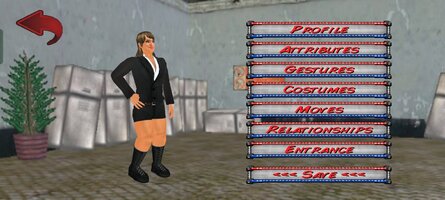
The "Wrestling Revolution" rumbles into the 3rd dimension, where it now features BOTH aspects of the business in ONE epic universe. A wrestling career challenges you to take shots in the ring, whereas a "booking" career allows you to call the shots backstage - promoting entertaining matches every week for ratings. Seeing each side of the curtain gives you an even better appreciation for the other, and ensures you'll never grow bored of wrestling again! Both modes are available to play for free, with the option to upgrade to enjoy the "Pro" experience with no ads or limitations.
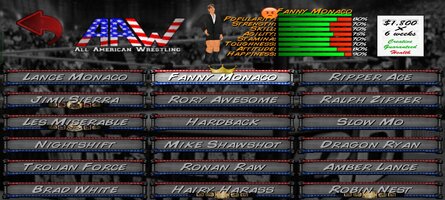
And if playing Pro isn't enough, a separate "Backstage Pass" allows you to play God by saving your changes to all 9 rosters before pitting your immortals against each other in dream matches of your own creation! With 4 pages of rules to mix & match - including up to 20 wrestlers in rings of any shape or size - the only limit is your imagination. You can also blow off steam with no pressure by revisiting the 8 weeks of supercards from the game's promotional tour. Not to mention the interactive training process that teaches you how to lock up in the first place.
BASIC CONTROLS
The game features an interactive tutorial that you are advised to play through, but the basic controls are as follows:
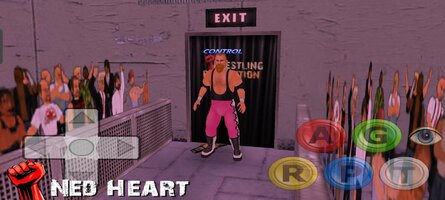
CURSORS = Movement (double-tap to dash)
A = Attack (with a direction to aim high, without to aim low)
G = Grapple
R = Run
P = Pick-Up / Drop (with a direction to throw)
T = Taunt / Pin / Referee duties
EYE = Change focus / Turn opponent around
HEALTH METER = Switch character
CLOCK = Pause / Change camera angle
* This game is also compatible with Android controllers such as NVidia Shield 2k or MOGA Pro ("B" Mode).
PERFORMANCE
Although every effort has been made to keep performance as high as possible, some devices may benefit from a visit to the Options menu to fine tune the display:
- The number of characters is perhaps the biggest factor so consider turning off referees and setting a limit on the match size.
- If you don't want to sacrifice numbers, you can sacrifice polygons instead and opt for "Basic" character models (no fingers).
- The ropes are surprisingly demanding and you may squeeze in an extra character if you make them "Static".
- Turning off shadows and reducing crowd sprites may also help.
I regret that there's more to this game than I could ever fit in an app store description, so please consult the online guides for further reading:
www.MDickie.com/guides/wr3d_booking.htm
* Please note that Wrestling Revolution depicts a fictitious universe. Any similarity to real wrestlers or promotions is purely coincidental.
The "Wrestling Revolution" rumbles into the 3rd dimension, where it now features BOTH aspects of the business in ONE epic universe. A wrestling career challenges you to take shots in the ring, whereas a "booking" career allows you to call the shots backstage - promoting entertaining matches every week for ratings. Seeing each side of the curtain gives you an even better appreciation for the other, and ensures you'll never grow bored of wrestling again! Both modes are available to play for free, with the option to upgrade to enjoy the "Pro" experience with no ads or limitations.
And if playing Pro isn't enough, a separate "Backstage Pass" allows you to play God by saving your changes to all 9 rosters before pitting your immortals against each other in dream matches of your own creation! With 4 pages of rules to mix & match - including up to 20 wrestlers in rings of any shape or size - the only limit is your imagination. You can also blow off steam with no pressure by revisiting the 8 weeks of supercards from the game's promotional tour. Not to mention the interactive training process that teaches you how to lock up in the first place.
BASIC CONTROLS
The game features an interactive tutorial that you are advised to play through, but the basic controls are as follows:
CURSORS = Movement (double-tap to dash)
A = Attack (with a direction to aim high, without to aim low)
G = Grapple
R = Run
P = Pick-Up / Drop (with a direction to throw)
T = Taunt / Pin / Referee duties
EYE = Change focus / Turn opponent around
HEALTH METER = Switch character
CLOCK = Pause / Change camera angle
* This game is also compatible with Android controllers such as NVidia Shield 2k or MOGA Pro ("B" Mode).
PERFORMANCE
Although every effort has been made to keep performance as high as possible, some devices may benefit from a visit to the Options menu to fine tune the display:
- The number of characters is perhaps the biggest factor so consider turning off referees and setting a limit on the match size.
- If you don't want to sacrifice numbers, you can sacrifice polygons instead and opt for "Basic" character models (no fingers).
- The ropes are surprisingly demanding and you may squeeze in an extra character if you make them "Static".
- Turning off shadows and reducing crowd sprites may also help.
I regret that there's more to this game than I could ever fit in an app store description, so please consult the online guides for further reading:
www.MDickie.com/guides/wr3d_booking.htm
* Please note that Wrestling Revolution depicts a fictitious universe. Any similarity to real wrestlers or promotions is purely coincidental.
*MOD Features*
All paid content purchased.
Credit to: ?
Free Download:
! Hidden Content !
You must be registered and either click Like under this post or leave a comment before you can see the hidden links.
You may need to refresh the page after clicking Like. If you’re still having trouble revealing the hidden links, please
read this.
Did you know? VIP Members can see all links instantly, no unlocking required.
Interested? Get VIP here.
Interested? Get VIP here.
______________________________________
If credits are unknown or incorrect and you are the modder you are free to message @G-Bo and the credits will be corrected asap!
What you need to know about Shared-MODs
*How to install (click the spoilers to read)*
Signed APKs do work on all Android devices (rooted + non-rooted).
Signed APKs are in the most cases the only provided files by the mod publisher as they work for everyone.
1.) Remove the original game/app.
2.) Download the MOD APK.
3.) Install the downloaded MOD APK.
4.) Enjoy.
Regarding login methods, please note that logging in with Google will not be possible when using signed MODs. Facebook login (if available) is possible, but it requires you to remove the Facebook application from your device. Other game-specific login methods (if available), such as email, transfer code or guest login usually work fine.
Notes:
- If you used our MOD APK before and just want to update, you can install the new MOD APK on top of the old without removing the game/app first.
- In-App purchases are not possible on signed APKs as they require Google services similar to the Google login process.
Signed APKs are in the most cases the only provided files by the mod publisher as they work for everyone.
1.) Remove the original game/app.
2.) Download the MOD APK.
3.) Install the downloaded MOD APK.
4.) Enjoy.
Regarding login methods, please note that logging in with Google will not be possible when using signed MODs. Facebook login (if available) is possible, but it requires you to remove the Facebook application from your device. Other game-specific login methods (if available), such as email, transfer code or guest login usually work fine.
Notes:
- If you used our MOD APK before and just want to update, you can install the new MOD APK on top of the old without removing the game/app first.
- In-App purchases are not possible on signed APKs as they require Google services similar to the Google login process.
Unsigned APKs do only work on rooted and patched devices/environments.
These are not always provided by the mod publisher as they do only work under certain circumstances.
1.) Your device must be rooted.
2.) Your device must be patched to ignore app signatures. This can be done with the help of tools such as Luckypatcher or Xposed.
Once you fill that requirements the process is the same as with signed APKs with the difference that you can overwrite the original game/app with the MOD APK without removing it first.
1.) Download the unsigned MOD APK.
2.) Install the unsigned MOD APK.
3.) Enjoy.
Note:
For the case the unsigned APK does fail to install: Your device patch is not done correctly!
Login methods and In-App purchases on unsigned MODs function the same as in the original game. Logging in with Google works without issues. Keeping the Facebook application installed is also no problem.
You are rooted and want to know how to patch your device? Please check this for more information:
[Videotutorial] How To Login With Google+ Or Facebook App On Modded Games
These are not always provided by the mod publisher as they do only work under certain circumstances.
1.) Your device must be rooted.
2.) Your device must be patched to ignore app signatures. This can be done with the help of tools such as Luckypatcher or Xposed.
Once you fill that requirements the process is the same as with signed APKs with the difference that you can overwrite the original game/app with the MOD APK without removing it first.
1.) Download the unsigned MOD APK.
2.) Install the unsigned MOD APK.
3.) Enjoy.
Note:
For the case the unsigned APK does fail to install: Your device patch is not done correctly!
Login methods and In-App purchases on unsigned MODs function the same as in the original game. Logging in with Google works without issues. Keeping the Facebook application installed is also no problem.
You are rooted and want to know how to patch your device? Please check this for more information:
[Videotutorial] How To Login With Google+ Or Facebook App On Modded Games
OBB files are not required by every game/app. If necessary, the mod publisher will usually provide them and tell you that they are needed.
1.) Download the OBB file/files.
2.) Download the MOD APK.
3.) Move the OBB files with the help of a filemanager to Android/obb/<packagecode> on your device.
4.) Install the downloaded MOD APK.
5.) Enjoy.
The OBB files are either provided as ".obb" files or as ".zip" files. ZIP files do require to be extracted first.
Still facing issues? Please check here for more details:
How to install OBB files [as detailed as possible]
1.) Download the OBB file/files.
2.) Download the MOD APK.
3.) Move the OBB files with the help of a filemanager to Android/obb/<packagecode> on your device.
4.) Install the downloaded MOD APK.
5.) Enjoy.
The OBB files are either provided as ".obb" files or as ".zip" files. ZIP files do require to be extracted first.
Still facing issues? Please check here for more details:
How to install OBB files [as detailed as possible]
Tutorials:
How to sign up and download on Platinmods.com
List of useful tutorials about how to use this website and its content