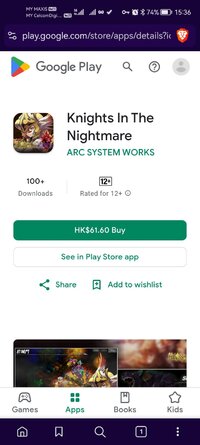
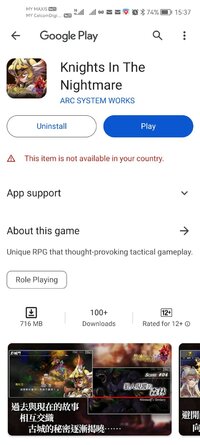
Playstore Link:
Knights In The Nightmare - Apps on Google Play
Unique RPG that thought-provoking tactical gameplay.
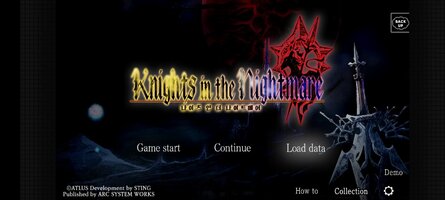
Game Name: Knights In The Nightmare
Game Version: 1.0.0
Needs OBB: No
Needs Root: No
【Story】
Somewhere between heaven and the underworld,
in the center of a quiet lake, stood an ancient castle known as Aventheim.
One night, without warning, denizens of the netherworld emerged and slaughtered the kingdom; nary a soul was left alive.
Within an abandoned, long-forgotten church deep in the woods, a wisp is set free.
Bereft of memory, it is drawn toward the monster-infested castle and re-awakens the souls of the vanquished knights,
leading them back towards the fallen stronghold to confront the very forces of evil that took their lives!
【Features】
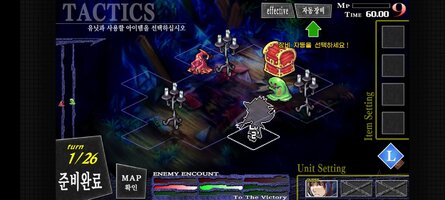
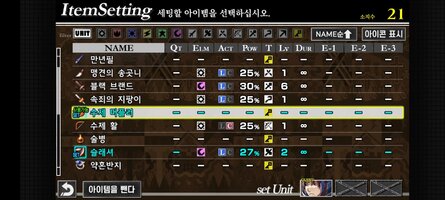
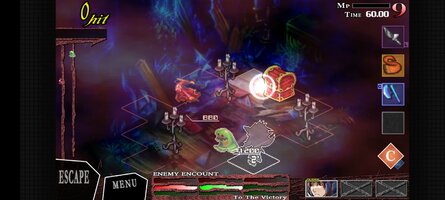
"Knights In The Nightmare" is the real-time strategic RPG in which the player becomes a wisp and commands the loyal knights to fight against the enemy on the battlefield.
Control the wisp to avoid enemy barrage, and command the loyal knights to defeat them!
You can recruit more than 140 knights that have various relationships, such as friends, family, etc.
You can use "Pause talk" to reveal the hidden truth and relationships.
[Recommended OS]
Android 8 or later device
Memory 3GB or more
*Depending on CPU processing speed
Your device may become hot.
【Notes】
- If the app does not start properly, try closing other apps and then restarting the device.
- If you find it difficult to operate, we have two operating methods available, so you can choose the type that is easier to use from the options.
・Please note that once the app itself and data related to the app are deleted, they cannot be restored.
・Save data can be transferred by saving it to the cloud.
*Items cannot be transferred between other OSs.
・If you have any other problems, please contact Support.
[Disclaimer]
(1) You can purchase the product on devices that have been tested for operation and with OS versions other than the recommended ones, but please note that operation will not be supported.
(2)Depending on the customer's usage situation, operation may be unstable even with the recommended model.
(3) Regarding the recommended OS version, if it is stated as "XXX or higher", it does not necessarily mean that it is compatible with the latest version.
Somewhere between heaven and the underworld,
in the center of a quiet lake, stood an ancient castle known as Aventheim.
One night, without warning, denizens of the netherworld emerged and slaughtered the kingdom; nary a soul was left alive.
Within an abandoned, long-forgotten church deep in the woods, a wisp is set free.
Bereft of memory, it is drawn toward the monster-infested castle and re-awakens the souls of the vanquished knights,
leading them back towards the fallen stronghold to confront the very forces of evil that took their lives!
【Features】
"Knights In The Nightmare" is the real-time strategic RPG in which the player becomes a wisp and commands the loyal knights to fight against the enemy on the battlefield.
Control the wisp to avoid enemy barrage, and command the loyal knights to defeat them!
You can recruit more than 140 knights that have various relationships, such as friends, family, etc.
You can use "Pause talk" to reveal the hidden truth and relationships.
[Recommended OS]
Android 8 or later device
Memory 3GB or more
*Depending on CPU processing speed
Your device may become hot.
【Notes】
- If the app does not start properly, try closing other apps and then restarting the device.
- If you find it difficult to operate, we have two operating methods available, so you can choose the type that is easier to use from the options.
・Please note that once the app itself and data related to the app are deleted, they cannot be restored.
・Save data can be transferred by saving it to the cloud.
*Items cannot be transferred between other OSs.
・If you have any other problems, please contact Support.
[Disclaimer]
(1) You can purchase the product on devices that have been tested for operation and with OS versions other than the recommended ones, but please note that operation will not be supported.
(2)Depending on the customer's usage situation, operation may be unstable even with the recommended model.
(3) Regarding the recommended OS version, if it is stated as "XXX or higher", it does not necessarily mean that it is compatible with the latest version.
*MOD Features*
This game allows you to experience the full content.
Free Download:
! Hidden Content !
You must be registered and either click Like under this post or leave a comment before you can see the hidden links.
You may need to refresh the page after clicking Like. If you’re still having trouble revealing the hidden links, please
read this.
Did you know? VIP Members can see all links instantly, no unlocking required.
Interested? Get VIP here.
Interested? Get VIP here.
______________________________________
If credits are unknown or incorrect and you are the modder you are free to message @G-Bo and the credits will be corrected asap!
What you need to know about Shared-MODs
*How to install (click the spoilers to read)*
Signed APKs do work on all Android devices (rooted + non-rooted).
Signed APKs are in the most cases the only provided files by the mod publisher as they work for everyone.
1.) Remove the original game/app.
2.) Download the MOD APK.
3.) Install the downloaded MOD APK.
4.) Enjoy.
Regarding login methods, please note that logging in with Google will not be possible when using signed MODs. Facebook login (if available) is possible, but it requires you to remove the Facebook application from your device. Other game-specific login methods (if available), such as email, transfer code or guest login usually work fine.
Notes:
- If you used our MOD APK before and just want to update, you can install the new MOD APK on top of the old without removing the game/app first.
- In-App purchases are not possible on signed APKs as they require Google services similar to the Google login process.
Signed APKs are in the most cases the only provided files by the mod publisher as they work for everyone.
1.) Remove the original game/app.
2.) Download the MOD APK.
3.) Install the downloaded MOD APK.
4.) Enjoy.
Regarding login methods, please note that logging in with Google will not be possible when using signed MODs. Facebook login (if available) is possible, but it requires you to remove the Facebook application from your device. Other game-specific login methods (if available), such as email, transfer code or guest login usually work fine.
Notes:
- If you used our MOD APK before and just want to update, you can install the new MOD APK on top of the old without removing the game/app first.
- In-App purchases are not possible on signed APKs as they require Google services similar to the Google login process.
Unsigned APKs do only work on rooted and patched devices/environments.
These are not always provided by the mod publisher as they do only work under certain circumstances.
1.) Your device must be rooted.
2.) Your device must be patched to ignore app signatures. This can be done with the help of tools such as Luckypatcher or Xposed.
Once you fill that requirements the process is the same as with signed APKs with the difference that you can overwrite the original game/app with the MOD APK without removing it first.
1.) Download the unsigned MOD APK.
2.) Install the unsigned MOD APK.
3.) Enjoy.
Note:
For the case the unsigned APK does fail to install: Your device patch is not done correctly!
Login methods and In-App purchases on unsigned MODs function the same as in the original game. Logging in with Google works without issues. Keeping the Facebook application installed is also no problem.
You are rooted and want to know how to patch your device? Please check this for more information:
[Videotutorial] How To Login With Google+ Or Facebook App On Modded Games
These are not always provided by the mod publisher as they do only work under certain circumstances.
1.) Your device must be rooted.
2.) Your device must be patched to ignore app signatures. This can be done with the help of tools such as Luckypatcher or Xposed.
Once you fill that requirements the process is the same as with signed APKs with the difference that you can overwrite the original game/app with the MOD APK without removing it first.
1.) Download the unsigned MOD APK.
2.) Install the unsigned MOD APK.
3.) Enjoy.
Note:
For the case the unsigned APK does fail to install: Your device patch is not done correctly!
Login methods and In-App purchases on unsigned MODs function the same as in the original game. Logging in with Google works without issues. Keeping the Facebook application installed is also no problem.
You are rooted and want to know how to patch your device? Please check this for more information:
[Videotutorial] How To Login With Google+ Or Facebook App On Modded Games
OBB files are not required by every game/app. If necessary, the mod publisher will usually provide them and tell you that they are needed.
1.) Download the OBB file/files.
2.) Download the MOD APK.
3.) Move the OBB files with the help of a filemanager to Android/obb/<packagecode> on your device.
4.) Install the downloaded MOD APK.
5.) Enjoy.
The OBB files are either provided as ".obb" files or as ".zip" files. ZIP files do require to be extracted first.
Still facing issues? Please check here for more details:
How to install OBB files [as detailed as possible]
1.) Download the OBB file/files.
2.) Download the MOD APK.
3.) Move the OBB files with the help of a filemanager to Android/obb/<packagecode> on your device.
4.) Install the downloaded MOD APK.
5.) Enjoy.
The OBB files are either provided as ".obb" files or as ".zip" files. ZIP files do require to be extracted first.
Still facing issues? Please check here for more details:
How to install OBB files [as detailed as possible]
Tutorials:
How to sign up and download on Platinmods.com
List of useful tutorials about how to use this website and its content